How to Manage Your 3D Content Effectively and Efficiently
How to Manage Your 3D Content Effectively and Efficiently
3D DAM Asset Operations
12 min
Technical blogger
Diego Santos
Updated:
Posted:
Managing 3D content can feel like trying to organize a workshop while the tools keep changing shelves. That feeling is common, especially when you are new to 3D. You can still learn to manage 3D content effectively with a few simple systems that stay consistent, even when your catalog grows.
In this guide, I will walk you through 3D content management best practices that reduce stress and make your work smoother over time. You will build a 3D digital asset management workflow, learn how to organize 3D assets efficiently, and shape a 3D content organization strategy that scales from a small pilot to a serious library.
A quick promise before we start. You do not need to be a pipeline wizard. You only need a structure that makes the right action the easiest action.
Quick Summary 6 Expert Strategies for 3D Content Management
Effective 3D content management combines centralized storage with intelligent automation.
Centralized DAM. A cloud based system becomes a single source of truth for all 3D assets.
Naming conventions. Standardize with a format like Project_AssetType_Version so people find files fast.
Metadata tagging. Tag by format, use case, and polygon count so search works beyond file names.
Version control. Track revisions to reduce errors and maintain a clean history per model.
Optimization workflows. Use polygon decimation plus modern compression for web and mobile performance.
Automation and AI. Automate format conversion and rendering so repetitive tasks stop eating your week.
Why 3D Content Management Is Different and Harder
A JPEG is usually one file. A 3D product asset is a bundle of connected parts. You often manage a mesh, textures, UV maps, materials, and multiple export formats. Sometimes you also manage animations, cameras, lights, and platform specific constraints for web and AR.
This is where beginners often feel overwhelmed, and it is completely understandable. A small asset set becomes a large library faster than people expect.
Now picture a common situation in 2026. Your ecommerce team wants a lightweight model for a product page. Your AR team wants a USDZ for mobile preview. Your studio wants a high detail source for future renders. Then your marketing lead requests an updated colorway for ads next week.
Without a system, the library splits into copies. That is where hidden costs show up.
Duplicated work appears first. Artists redo conversions and optimization because nobody trusts the last export. Marketers wait for “one more” updated file because it is unclear which version is approved.
Lost context comes next. A model looks correct, yet nobody remembers why a material changed, which camera angle was approved, or whether the logo update landed everywhere.
Outdated versions become the last problem. A product page goes live with an old model, or a paid campaign uses an asset that was never approved for public release.
This is exactly why a strong 3D content organization strategy matters. Good management is not bureaucracy. It is what lets creative work move faster with fewer mistakes.
The 6 Pillars of Effective 3D Content Management
Centralized Storage Build a Single Source of Truth
Centralized 3D asset storage is the foundation that makes everything else easier. When 3D files live across laptops, shared drives, and chat attachments, teams spend hours searching and second guessing.
Cloud based 3D storage improves daily work in two ways.
First, it reduces search time because everyone knows where the latest approved assets live.
Second, it makes collaboration on 3D models safer because access control, review notes, and version history stay close to the asset rather than scattered across messages.
A helpful mental model is to separate your assets into two families.
Master assets are the highest fidelity source files your team trusts long term. They are the truth that can produce everything else.
Delivery assets are the outputs you publish and distribute. Think GLB for web viewers, USDZ for iOS AR, thumbnails, turntables, and product renders.
This matters for marketing because the best campaigns reuse the same product truth across channels. When assets are centralized, your product pages, social ads, and AR previews stay aligned. That consistency increases trust, and trust supports conversion.
Vivid 3D is built around that single source of truth idea. It combines production workflow management, reviews, approvals, and digital asset management so the library stays organized while volume grows. It also keeps publishing and delivery close to the library, which helps teams move from “asset stored” to “asset live” with less friction.
Another reason this matters in 2026 is the industry shift toward visual data. Many teams want the same assets to power immersive commerce and also support AI oriented workflows like synthetic data and computer vision pipelines. Vivid 3D is designed with that direction in mind, rather than treating it as an afterthought.
Naming Conventions and Folder Structure
Naming conventions look simple, then they quietly save real hours. They also reduce the anxiety of using the wrong file.
A strong naming standard works because it matches how people search. Marketers often remember the product and campaign. Artists remember the asset type and LOD. Engineers remember the format target.
A practical standard looks like this.
ProjectName_AssetType_ProductID_LOD_vVersion
Each part solves a real problem.
ProjectName separates workstreams so catalogs do not mix.
AssetType prevents confusion between source meshes, textures, scenes, and rendered outputs.
ProductID connects your DAM to your PIM, SKU list, or internal catalog.
LOD signals performance intent, which helps web, AR, and realtime teams stay aligned.
vVersion gives you clean progression without messy “final final” variations.
Now match that with a folder structure that stays predictable and shallow. People should reach the asset fast. Overly deep folders create hesitation, and hesitation leads to copies living “somewhere easier.”
A beginner friendly way to roll this out is to start with one pilot product line. Apply the naming and folder pattern. Then share that pilot as the official example. Teams adopt standards faster when they can copy a working pattern.
Rich Metadata for 3D Specific Searchability
File names are useful. Metadata makes your library truly usable.
Metadata tagging for 3D assets should reflect the questions people actually ask.
Which model is web ready. Which model is AR ready. Which assets are under a certain polygon count. Which version is approved for marketing. Which assets share the same material family or texture size.
Metadata also unlocks smarter automation. Once polygon count, texture size, and channel intent are stored, your pipeline can route assets into the right optimization and publishing steps automatically. That is where organization turns into speed.
Here is a practical starter set you can implement quickly.
Metadata field
Example value
Why it helps
Product ID
SKU_184930
Connects DAM to commerce and catalog systems
Format
GLB USDZ USD
Supports correct publishing targets
Use case
Web PDP, Mobile AR, Print
Reduces wrong exports in campaigns
Polycount
45000_triangles
Enables performance filtering
Texture size
2k 4k
Helps manage load time and quality
Materials
PBR metal rough
Supports visual consistency
LOD set
LOD0_LOD1_LOD2
Keeps web and mobile aligned
Rights
Licensed, internal
Protects compliance and reuse
Once metadata is reliable, search becomes easier for beginners. It also becomes easier to automate and scale.
This is another area where Vivid 3D can be genuinely helpful. It is designed as a visual data platform, so organizing, searching, and reusing assets is not only a library feature, it is part of the full workflow.
Version Control Never Lose a Revision
Version control for 3D files is not only about keeping old versions. It is about keeping decisions attached to the correct file.
Most teams run into the same problem. A file name says “final,” yet nobody knows whether that means final for review, final for marketing, or final for shipping. That confusion is why the “final_v2_REAL_final” habit appears.
A strong version control approach respects three realities.
3D files are heavy and often binary, so storage needs to be reliable.
3D review is visual, so you want previews, comparisons, and annotation rather than only a list of uploads.
Approvals are business decisions, so you want a clear path from draft to approved, plus rollback when something breaks.
Two simple statuses bring calm to most teams.
In Review = feedback is open and the asset is not ready to publish. Approved = the asset is cleared for publishing and automation outputs.
Vivid 3D is designed around content production management and approvals, which helps teams reduce version chaos while increasing throughput.
Optimization Size, Speed, and Quality
Optimization can feel intimidating at first, so here is the reassuring truth. Optimization is a repeatable set of choices that turns source quality into channel ready quality.
Raw CAD and high detail assets are rarely ready for web or AR. They are too heavy, too complex, and often contain geometry that does not improve what shoppers see.
A clean optimization pipeline follows the same order nearly every time.
Decimate or retopologize to reduce geometry while keeping shape.
Compress geometry and textures for faster delivery.
Convert to the required formats.
Validate quality and performance.
Deliver to your viewer, configurator, or AR channel.
This matters more than ever for digital marketers in 2026. Interactive 3D on the web is becoming more mainstream as WebGPU matures, so performance budgets directly affect bounce rate and conversion, not only engineering happiness. Here is a high authority reference that supports that direction, W3C WebGPU specification is here
Texture compression is another major win that many marketing teams overlook. KTX 2.0 and modern GPU friendly compression reduce load time and memory use, which helps shoppers on mobile connections.
Mobile AR also benefits from practical size discipline. Apple resources regularly emphasize keeping AR assets lightweight for smooth experiences, which aligns well with a clear file size goal for your AR derivatives.
To support planning, here is a beginner friendly set of targets. Treat these as guardrails while you learn, then adjust based on your product type and audience devices.
Channel
Geometry guidance
Texture guidance
File size goal
Web PDP viewer
25000 to 100000 triangles
2k textures, compressed
Under 10 to 20 MB
Mobile AR
10000 to 60000 triangles
1k to 2k textures, compressed
Under 25 MB
High quality renders
Higher detail is fine
4k textures can work
Driven by render output
A practical tip that saves time is to store optimized derivatives next to the master asset and tag them clearly. That supports 3D asset reuse and cataloging, and it stops repeated optimization work across marketing and production.
Automated Workflows and AI
Automation is where your workflow starts to feel easy. It also becomes the difference between scaling calmly and scaling painfully.
Automation works best after the first five pillars are in place, because automation needs reliable inputs. Naming, metadata, and version control become the fuel.
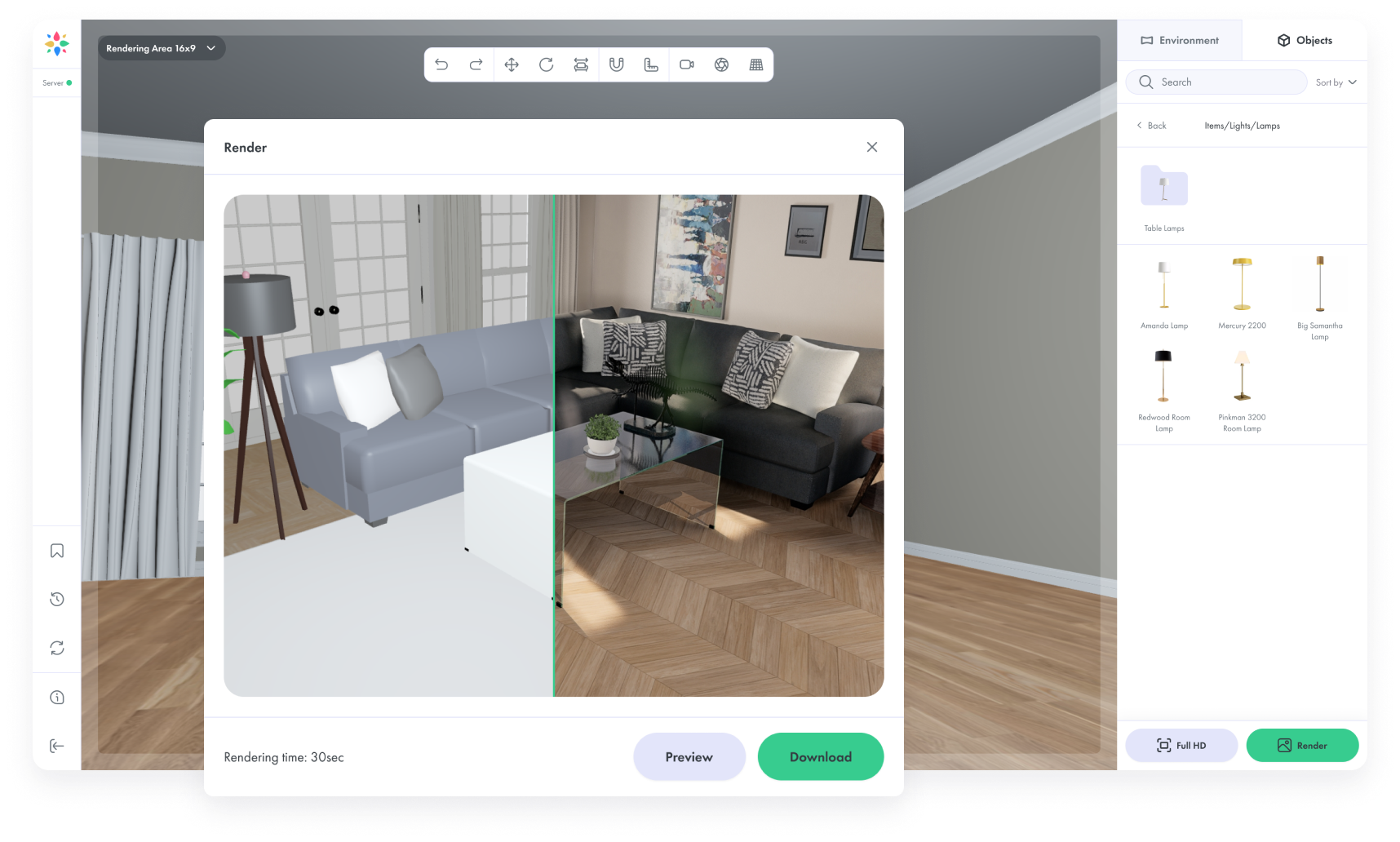
In practice, AI and automation can cover repetitive work such as batch rendering for consistent catalog imagery, automated format conversion so approved assets always generate correct outputs, and quality checks such as missing textures or polycount outliers.
In 2026, a bigger trend is emerging. Many companies are treating 3D asset libraries as visual data libraries. That means the same well managed asset can power commerce experiences and also generate synthetic datasets for computer vision training. Vivid 3D is positioned well for that direction because it connects 3D management with AI tooling and synthetic data generation.
Vivid 3D features that tend to be especially valuable for teams scaling 3D content include centralized DAM, fast production workflows from idea to approval, strong collaboration and review flows, a universal player for 2D, 3D, AR, and streaming, a product configuration engine for interactive commerce, and high speed rendering infrastructure for generating consistent visuals quickly.
The Benefits of Getting It Right
Once your 3D digital asset management workflow is stable, benefits appear across every team.
Productivity improves because people create more and search less. That is huge for marketing teams operating on deadlines.
Collaboration improves because feedback is attached to the right version, and approvals are visible to everyone.
Scalability improves because the system holds up as the catalog grows.
Cost reduction follows because reuse becomes normal. One asset can serve a product page, an AR preview, a configurator, and campaign visuals without duplicating work.
There is also a confidence benefit that many teams underestimate. When your asset system is reliable, people stop worrying about using the wrong file. That reduces hesitation and speeds up launches.
Building Your 3D Workflow A Step by Step Approach
Step 1 Audit your existing assets. Create a simple inventory. Track file types, locations, formats, and obvious duplicates. This is about clarity, not blame.
Step 2 Define naming and folder conventions. Pick one standard and roll it out in a pilot catalog. Document it in a short guide with real examples.
Step 3 Set up cloud based DAM. Move the pilot assets into a centralized system. Configure access roles and review flows. Make Approved assets easy to find for non 3D teammates.
Step 4 Implement optimization pipelines. Create two or three performance profiles based on channels such as web, mobile AR, and high quality renders. Then store derivatives next to the master.
Step 5 Automate recurring exports. Link approvals to publishing outputs so approved assets generate GLB, USDZ, thumbnails, and marketing renders automatically. Then connect those outputs to your ecommerce stack so updates reach product pages and campaigns faster.
This is where Vivid 3D can be especially helpful, because it brings together management, production workflow, rendering, integration, and publishing in one platform. That reduces tool switching and reduces the chance of losing context between teams.
Conclusion From Chaos to Control, and a Look Into the Future
Here is my point of view after watching many teams grow their 3D libraries.
The next wave of 3D is not only about prettier visuals. It is about operational maturity. In 2026, the companies that win with 3D are the ones that treat 3D as a core business asset. Structure, governance, and automation become as important as artistry.
The web is getting stronger for realtime graphics. Mobile AR is becoming more normal in shopping journeys. At the same time, visual AI is moving fast, and more businesses are realizing that their 3D libraries can also become a source of training data and automated intelligence. That shift changes how we should think about asset management.
Instead of asking, “Where did we store the model,” the better question becomes, “How many outcomes can one well managed asset support.”
One product model can support an interactive product page, a configurator, a social ad render set, a customer support guide, and even AI driven visual workflows. That future feels realistic when your library is clean and your workflow is repeatable.
That is also why I like the direction behind Vivid 3D. It is not only a place to store files. It supports the full path from content creation workflows and approvals to publishing and rendering, and it extends into AI related visual data work for teams ready to grow into that next phase.
To finish, I want to leave you with something encouraging. Start small and stay consistent. Choose one naming standard. Choose one source of truth. Add metadata that helps your real teammates, especially the marketers who need fast access. Then build automation on top of that foundation. Momentum tends to arrive faster than people expect, and your workflow becomes lighter week by week.
Summary checklist you can apply this week
Create a single source of truth for approved assets.
Apply one naming convention across a pilot catalog.
Add metadata for format, use case, polycount, and texture size.
Use clear revision history with rollback and approval states.
Store optimized derivatives next to masters with clear tags.
Automate exports and rendering for consistent marketing output.




.png)