Sales Configurator vs. Product Configurator: Key Differences, Use Cases & How to Choose
Sales Configurator vs. Product Configurator: Key Differences, Use Cases & How to Choose
3D Content Production (Pipelines & Standards)
8 min
Technical blogger
Aisha Rahman
Updated:
13 Aug 2026
Posted:
13 Aug 2026
The terms sales configurator and product configurator are often used interchangeably — and that imprecision causes real problems when businesses are evaluating software, scoping implementation projects, or explaining requirements to vendors. The two tools solve related but fundamentally different problems. Understanding the distinction helps you buy the right thing, build the right thing, and avoid spending months implementing a system that addresses the wrong half of your actual challenge.
Quick Summary: Sales Configurator vs. Product Configurator
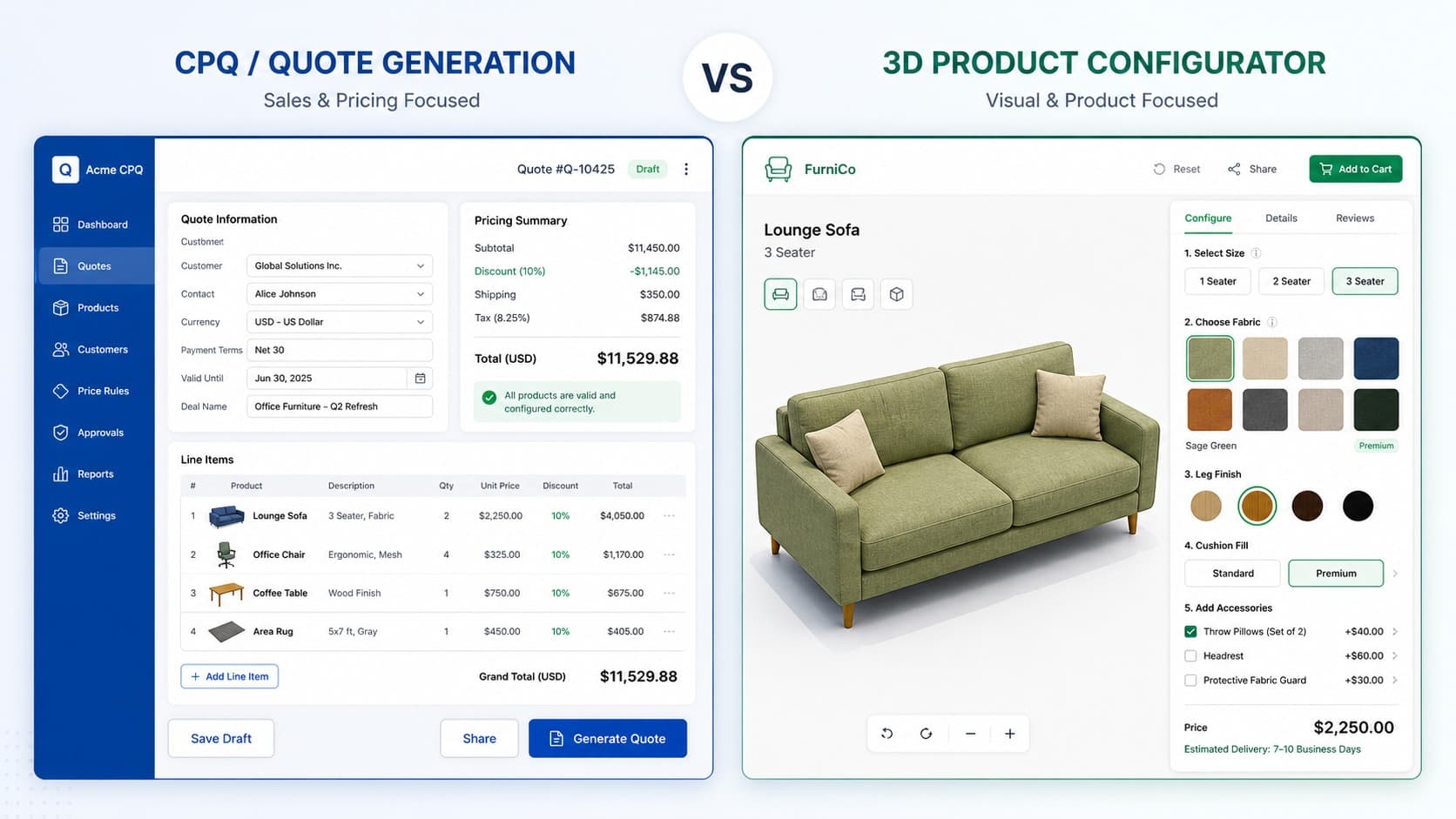
A sales configurator is a commercial tool — it guides sales teams through complex quoting, enforces pricing rules, and produces accurate proposals. Primary output: a quote or order document.
A product configurator is a visual and technical tool — it lets customers or engineers customize a product and see the result in real time. Primary output: a configured product specification, 3D visualization, or BOM.
Primary users differ: sales teams and account managers use sales configurators; end customers, designers, and engineers use product configurators.
Integration differs: sales configurators connect to CRM and ERP; product configurators connect to ecommerce platforms and DAM systems.
In 2026, the two are converging: modern platforms like Vivid 3D combine visual configuration with real-time CPQ output, so the distinction matters most when choosing a legacy or point-solution tool.
What Is a Sales Configurator?
A sales configurator — often called a CPQ tool (Configure, Price, Quote) — is software designed to help sales teams navigate complex product and pricing logic during the quoting process. Its core function is commercial accuracy: ensuring that the combination of products, features, and terms a sales rep puts in front of a customer is valid, correctly priced, and documentable without manual intervention.
In practice, a sales configurator does three things. It guides the sales rep through configuration options using predefined rules that prevent invalid selections — so no one accidentally quotes a product combination that cannot be manufactured or delivered. It calculates price in real time, applying volume discounts, tier pricing, material surcharges, promotional rules, and any approval thresholds that require sign-off before a quote can be sent. And it generates a formatted output — a quote document, proposal, or order summary — that can be sent to the customer and pushed downstream into the ERP or order management system.
The primary integration points for a sales configurator are CRM systems (Salesforce is the dominant example) and ERP platforms. The tool lives inside the sales workflow, not on a customer-facing product page.
When a Sales Configurator Is the Right Tool
Your sales team manually produces quotes for complex, multi-component products and the process is slow or error-prone
Pricing is dynamic — tier-based, customer-specific, volume-driven, or subject to approval workflows
Products have constraint logic that sales reps need to navigate correctly (certain components cannot be combined, certain features require minimum order quantities)
The sales cycle involves multiple stakeholders and formal proposal documents
You sell complex B2B products: industrial equipment, software licenses, professional services bundles, engineered-to-order goods
What Is a Product Configurator?
A product configurator is a tool that lets a user — typically a customer, but sometimes a designer or engineer — customize a product by selecting options, and immediately see the result. The defining characteristic is the feedback loop: every selection changes something visible. In a 3D product configurator, that means a photorealistic render updates in real time as the user changes materials, dimensions, components, or modules.
Where a sales configurator is process-oriented (the output is a document), a product configurator is experience-oriented (the output is confidence). The buyer sees exactly what they are ordering before they commit. For manufacturers, the configurator also generates a structured output — a bill of materials, a specification file, or an order payload — that feeds directly into production without manual translation.
The primary integration points for a product configurator are ecommerce platforms (Shopify, Magento, WooCommerce) and digital asset management systems. The tool lives on the product page or in a showroom, not inside a sales team's CRM.
When a Product Configurator Is the Right Tool
Customers need to see what they are buying before committing — color, material, dimension, or configuration choices are visually meaningful
You sell products with many visual variants and photography of every combination is impractical or impossible
Customers self-serve through an ecommerce channel rather than going through a sales rep
You need to reduce returns driven by expectation mismatches between what customers imagined and what arrived
You sell furniture, home goods, apparel, accessories, consumer electronics, or any product where appearance drives the purchase decision
Key Differences: Sales Configurator vs. Product Configurator
Real-time 3D rendering, material swaps, AR preview
Integration focus
CRM (Salesforce), ERP, billing systems
Ecommerce (Shopify, Magento), DAM, PIM
Typical sales context
Complex B2B, long sales cycle, rep-assisted
B2C or B2B self-service, ecommerce, showroom
Visual component
Minimal — focus is commercial accuracy
Central — 3D rendering is the core experience
Constraint logic
Prevents invalid commercial combinations
Prevents invalid product combinations
Manufacturing output
Indirect — via ERP integration
Direct — BOM and production spec on order
Where the Two Overlap
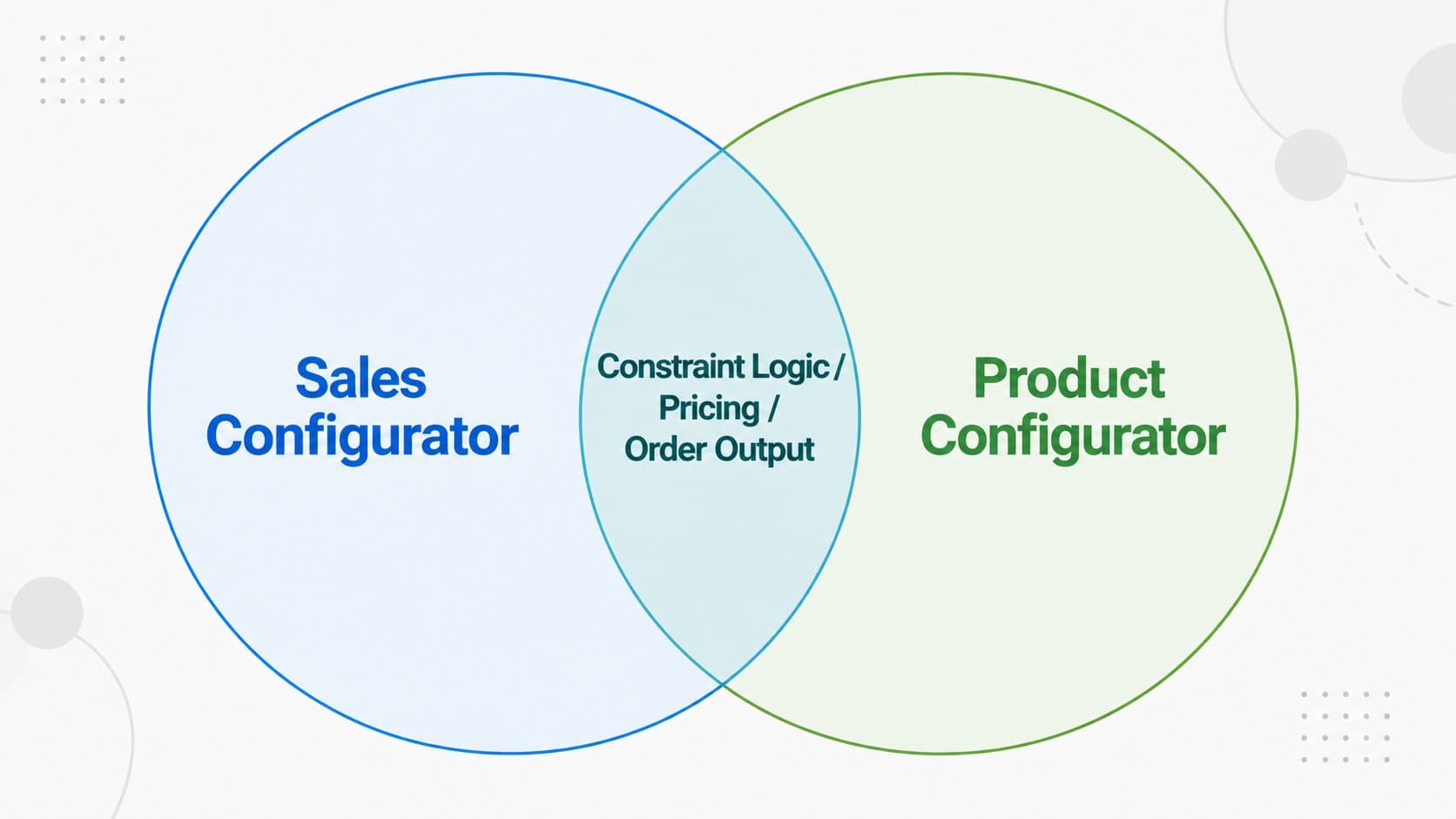
Both tools share one foundational requirement: constraint logic. Whether the configurator is commercial or visual, it must prevent users from building something that cannot be delivered. A sales configurator that allows incompatible product combinations will generate orders that fail in production. A product configurator that allows impossible material or dimension combinations will generate customer expectations that cannot be met. The rule engine — the set of logic that enforces valid states — is central to both.
Both tools also connect to pricing, though in different ways. A sales configurator owns pricing logic as its core function. A product configurator increasingly surfaces pricing as part of the user experience — updating the displayed total as options change — which requires a pricing engine of its own, even if it is simpler than a full CPQ system.
And both tools ultimately feed into the same downstream systems: the order management and manufacturing infrastructure that has to fulfill what the configurator promised. This is where integration architecture becomes a strategic decision rather than a technical one.
Real-World Use Cases
Sales Configurator in Action: Industrial Equipment Manufacturer
A manufacturer of custom HVAC systems sells through a dealer network. Each dealer configures systems based on building specifications, load requirements, and local compliance standards. The combinations are highly constrained and the pricing is tier-based and customer-specific. A sales configurator guides dealers through valid configurations, applies their contract pricing, generates a compliant quote, and pushes the approved order directly into the ERP — cutting quote turnaround from three days to under an hour.
Product Configurator in Action: Furniture Retailer
A furniture brand sells modular sofas online with 40+ fabric options, 4 leg styles, and 6 module configurations. A static product page with photography cannot cover the combination space. A 3D product configurator lets customers build their exact sofa, see a photorealistic render, check dimensions, and complete purchase — with the configured BOM passed automatically to the production team. Return rates drop because customers know what they ordered. Conversion rates rise because buyers are confident before checkout.
Both Together: B2B Office Furniture Brand
A sales rep visits a corporate client to spec out a large office fit-out. The client uses a product configurator on a tablet to explore desk configurations, material grades, and storage options in 3D — seeing realistic renders of each option in real time. When the client approves a configuration, the system generates a CPQ quote automatically, applies the client's negotiated pricing tier, and sends a formatted proposal for sign-off. Neither tool alone would cover this workflow. The product configurator builds confidence; the sales configurator closes the deal.
The Convergence Happening in 2026
The traditional separation between sales configurators and product configurators is narrowing. The reason is straightforward: buyers and sales teams increasingly want both things at once. A B2B buyer who is interacting with a 3D product configurator on a vendor's site does not want to wait for a separate quoting step — they want to see the price update as they configure. A sales rep using a CPQ tool to quote a complex product does not want to describe the product in text — they want to show a live 3D render.
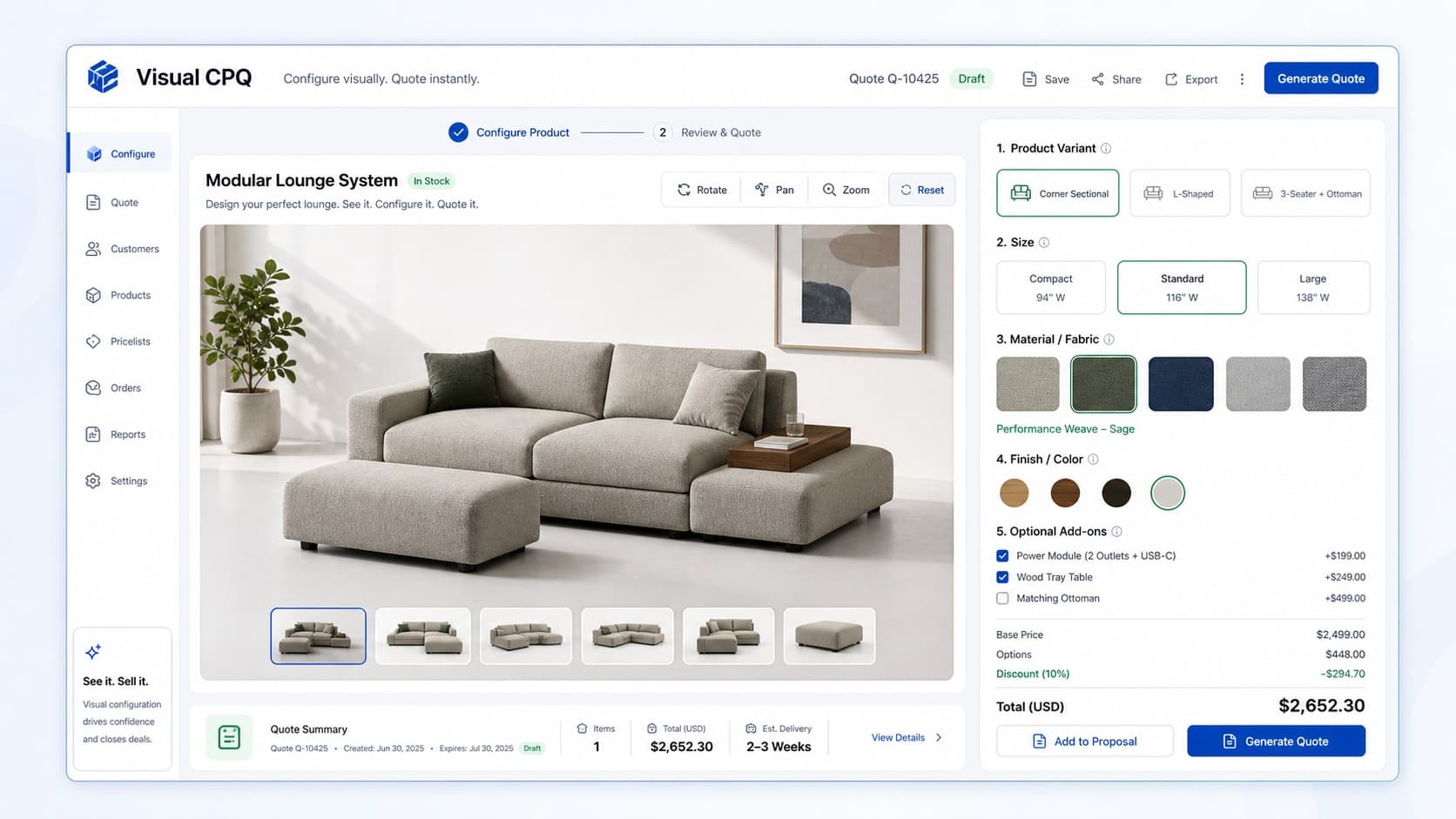
Modern platforms are responding to this by building visual CPQ — systems that combine real-time 3D rendering with the pricing and constraint logic that CPQ tools have always provided. The output of a single configuration session is simultaneously a buyer-facing visual experience and a sales-facing quote document.
Vivid 3D's platform is an example of this direction: Vivid.Build handles the product configuration layer — colors, materials, components — while Vivid.Player delivers the configured output across channels, and the pricing and order data flows downstream through integrations. The result is a system where the visual and commercial layers are part of the same workflow rather than two separate tools that need to be reconciled.
For teams evaluating configurator software in 2026, this convergence means the either/or framing of the question is becoming less useful. The more practical questions are: where does the configuration experience live, who initiates it, and what does the output need to feed?
How to Choose: A Decision Framework
Use these questions to identify which tool — or which combination — matches your actual situation.
Who configures the product?
If the answer is your sales team or dealer network, start with a sales configurator. If the answer is your end customer on a product page or showroom, start with a product configurator. If the answer is both, you need a system that serves both workflows — either a unified platform or two integrated tools.
What is the primary bottleneck in your sales process?
If quotes are slow, error-prone, or inconsistently priced, the bottleneck is commercial — a sales configurator addresses it. If customers are abandoning at the product page, returning products, or struggling to visualize what they are ordering, the bottleneck is experiential — a product configurator addresses it.
What does the output need to do?
If the output must become a formal quote or contract document that feeds into CRM and ERP, you need CPQ capability. If the output must become a production-ready BOM and a rendered image for order confirmation, you need a product configurator with manufacturing integration. If both, plan for a unified output layer from the start.
How visual is your product?
Products where appearance drives the purchase decision — furniture, apparel, consumer goods, custom vehicles — benefit most from the visual layer that product configurators provide. Products where the purchase decision is driven by technical specification and price — industrial components, software packages, service contracts — are better served by sales configurator logic even without photorealistic rendering.
What is the difference between a sales configurator and a CPQ?
CPQ (Configure, Price, Quote) is the category name for sales configurator software. The terms are interchangeable in most contexts. CPQ specifically describes the three-stage commercial workflow: configuring a valid product combination, applying pricing logic, and generating a quote document. Some vendors use "sales configurator" to emphasize the guided selling aspect of the tool, but both refer to the same category of software.
Can a product configurator replace a CPQ?
For simple products with straightforward pricing, a product configurator with a built-in pricing engine can handle what a basic CPQ does. For complex B2B scenarios — tiered pricing, approval workflows, multi-currency quoting, CRM integration — a dedicated CPQ system provides capabilities that most product configurators do not. Modern unified platforms are closing this gap, but for enterprise CPQ requirements, a specialist tool is still usually the right choice.
Do I need both a sales configurator and a product configurator?
If you sell through both direct sales and a self-serve ecommerce channel, and your product benefits from visual configuration, then yes — both layers add value. The question is whether you implement them as separate tools with an integration layer, or as a unified platform that serves both use cases from a single system. The unified approach is operationally simpler but requires finding a platform that genuinely covers both.
What is visual CPQ?
Visual CPQ is the convergence of product configurator and sales configurator functionality: a system that provides real-time 3D visualization of the configured product alongside dynamic pricing and CPQ output. The buyer or sales rep configures visually, sees the product update in real time, and gets an accurate quote generated automatically from the same session. This approach is increasingly common in furniture, manufacturing, and automotive sales contexts.
Which industries use sales configurators most?
Sales configurators are most common in industries with complex, modular, or highly customized products and long B2B sales cycles: industrial machinery and equipment, enterprise software, telecommunications infrastructure, financial services products, and construction materials. Any sector where a sales rep needs to navigate hundreds of compatible combinations and produce an accurate formal quote benefits from CPQ logic.
Which industries use product configurators most?
Product configurators are most valuable where visual differentiation drives purchase confidence: furniture and home goods, automotive (both consumer and fleet), apparel and footwear, consumer electronics, jewelry, and industrial products where spatial fit or aesthetic compatibility matters to the buyer. The common thread is that a static product image cannot adequately represent the range of options available or the result of a specific combination.