What Is a 3D Furniture Configurator and Why Your Business Needs One
What Is a 3D Furniture Configurator and Why Your Business Needs One
Retail Furniture & Visual Commerce
7 min
Technical blogger
Diego Santos
Updated:
13 Aug 2026
Posted:
14 Aug 2026
A 3D furniture configurator is an interactive web tool that lets customers customize furniture in real time - selecting materials, colors, dimensions, and modules - and see a photorealistic render of the result instantly. No page reload, no sending an email to a sales rep, no waiting for a quote. The buyer builds the product and sees what they're getting before they commit.
That sounds simple. The operational challenge underneath it isn't. Getting a furniture configurator to work correctly - handling modular logic, enforcing manufacturing constraints, connecting to your ERP, keeping 3D assets up to date across a large catalog - is where most implementations succeed or fail. This guide covers how a 3D furniture configurator actually works, what features separate production-ready platforms from demos, and what business results you can realistically expect.
What is a 3D furniture configurator?
An interactive web tool for real-time furniture customization - materials, colors, dimensions, modules - with photorealistic 3D output.
Displays every product variant as an accurate render, so buyers see exactly what they're ordering before purchase.
Modern configurators include Visual CPQ - automatically generating error-free quotes, BOMs, and order summaries at the moment of configuration.
Advanced platforms add AR preview, allowing customers to place configured furniture in their actual space via smartphone camera.
For manufacturers and retailers: fewer returns, shorter sales cycles, and higher average order value.
Platforms like Vivid 3D offer ready-to-deploy configurators with eCommerce and ERP integrations.
How a 3D Furniture Configurator Works
At the technical level, a furniture configurator loads 3D models in GLTF/GLB format - the browser-native standard for web 3D - and renders them in real time using WebGL. When a customer changes a fabric, swaps a leg finish, or adds a module, the rule engine checks whether that combination is valid and updates the visual output without reloading the page.
The rule engine is the part that most teams underestimate. A simple image-swap tool shows different photos when you click different options. A real configurator enforces product logic: this module doesn't attach to that base, this fabric isn't available in this width, this combination requires a structural component the buyer hasn't selected yet. Without a rule engine, you get orders your factory can't fulfill. With one, every completed configuration is buildable.
Pricing updates in parallel. The pricing engine recalculates the total with every selection - material surcharges, module add-ons, dimension-based pricing - so the buyer always sees an accurate number, not a placeholder that gets corrected in a follow-up email.
Integration with eCommerce platforms happens via API or native plugins. The configured product, its specifications, and its price pass directly into the cart and order management system. For manufacturers, the BOM generated at configuration time becomes the production order - no manual re-entry, no translation between what the customer bought and what the factory builds.
The five components that have to work together
3D viewer - browser-based rendering engine that handles materials, lighting, and geometry at photorealistic quality. The visual quality here determines buyer confidence. If the render doesn't look like the physical product, the configurator creates doubt rather than removing it.
Rule engine - enforces product logic for modular furniture configurator setups, blocking invalid combinations and guiding buyers toward configurations that can actually be manufactured. This is the operational core of the system.
Pricing engine - calculates price dynamically as options change, including tiered pricing, material surcharges, and volume rules. Must connect to your actual pricing data, not be hardcoded - otherwise every price change requires a development cycle.
AR module - lets customers place the configured product in their physical space via smartphone camera. For furniture, where scale and spatial fit drive a significant share of purchase hesitation, AR directly addresses the problem that product photography cannot.
Visual CPQ output - generates quotes, BOMs, and order summaries automatically at the moment of configuration. This is what makes the configurator operationally valuable for manufacturers and B2B sales teams, not just a front-end experience.
3D Furniture Configurator vs. Standard Product Images
The performance gap between static photography and interactive 3D is well-documented, but worth understanding specifically for furniture - a category where scale, material accuracy, and spatial fit are the three things that drive returns and abandoned carts.
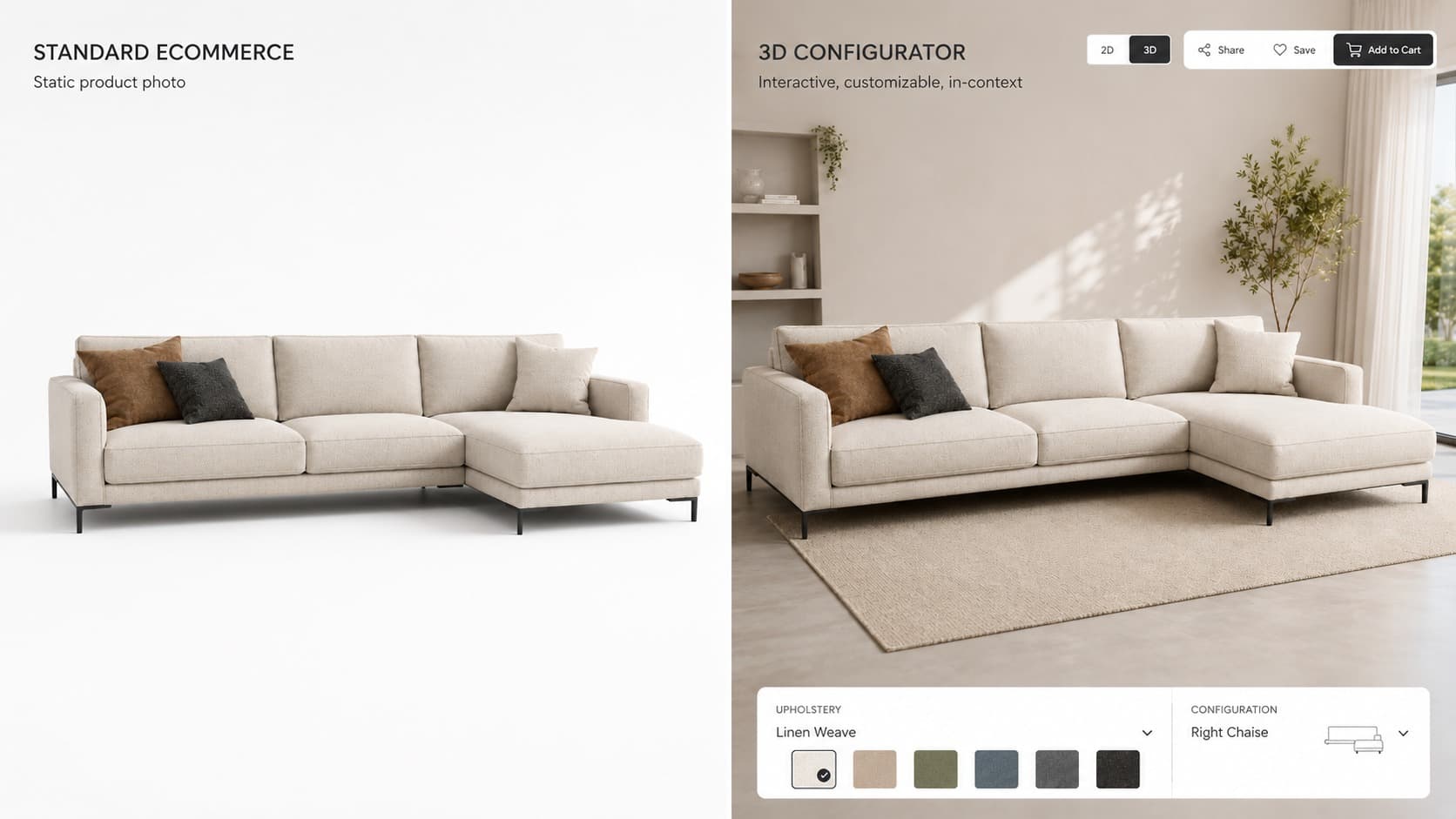
A product photo answers "what does this look like?" A 3D configurator answers "what does this look like in the color I want, at the dimensions I need, in a room like mine." Those are different questions, and the second one is the one that closes a furniture purchase.
Metric
Standard product images
3D furniture configurator
Conversion rate
Baseline
+20-40% uplift (industry studies)
Return rate
Higher - expectation mismatches common
Significantly reduced
Time on product page
Low - passive browsing
High - active engagement
Quoting speed (B2B)
Hours to days (manual)
Instant via Visual CPQ
Custom variant coverage
Limited by photography budget
Full catalog, all combinations
Shopify's research on 3D and AR in ecommerce found that products with interactive 3D content convert at rates up to 94% higher than products with standard images in some categories. For furniture specifically, the return rate reduction is often the bigger number - because returns in this category are expensive to process and usually driven by the same gap the configurator closes.
Business Impact: What Changes After Implementation
Conversion goes up because hesitation goes down. The buyer who isn't sure whether that fabric will look right, or whether the sofa will fit the wall, doesn't buy. The configurator answers both questions before checkout. VividWorks clients report up to 30% higher conversion rates on configurator-enabled product pages - directionally consistent with what other platforms report across furniture and home goods.
Returns drop because expectation gaps close. Most furniture returns aren't driven by product defects. They're driven by the gap between what the buyer imagined and what arrived. A buyer who configured their own product - chose the fabric, set the dimensions, placed it in AR in their living room - is unlikely to return it because it wasn't what they expected. They built what they expected.
Sales cycles compress for B2B. A sales rep who can configure a product in front of a client and send a verified CPQ quote before leaving the meeting replaces a process that used to take three days of back-and-forth with internal pricing teams. VividWorks reports 20-30% faster sales cycles for clients using visual CPQ. That's not a marginal improvement - it's a competitive advantage in dealer-driven categories.
Average order value increases through contextual upsell. A buyer who is actively configuring a product is primed to add modules, accessories, and upgrades - because they're already thinking about the product, not passively scrolling. A static product page with a cross-sell widget in the sidebar doesn't replicate that engagement state. A configurator that surfaces relevant add-ons at the moment of selection does.
Features That Actually Matter When Choosing a Platform
Every platform demos well. The differences show up when you push the catalog to full complexity, when a dealer tries to quote an edge case, or when marketing wants to add a new material option without involving engineering. Here's what to test before you commit:
Real-time photorealistic rendering. Materials, shadows, and reflections must read as accurate representations of the physical product. If the fabric looks different on screen than it does in person, the configurator creates doubt. Ask vendors to render your specific materials, not their showcase products.
Modular rule engine. Handles the combinatorial complexity of sectional sofas, modular shelving, and kitchen cabinet systems. The test is: can your team configure rules without developer involvement? If the answer is no, every catalog update becomes a ticket.
Visual CPQ with automated BOM and quoting. Every valid configuration should produce a structured output that feeds directly into an order or manufacturing workflow. Test this end-to-end with a real order, not a demo quote.
AR and VR preview. Mobile AR is now expected in consumer furniture retail. VR adds value for showroom and B2B presentation contexts. Ask whether AR works on mid-range Android devices, not just the latest iPhone.
3D room planner. Allows customers to place furniture in a scaled floor plan. Particularly valuable for kitchen, office, and modular living room categories where spatial fit is the primary purchase decision driver.
ERP, CRM, and eCommerce integrations. The configurator must connect to the systems that run the business. Ask for a reference customer running your specific ERP on the same integration, not a promised roadmap item.
Vivid 3D covers all six within a unified platform - including a built-in asset library and DAM workflows, which matters for manufacturers managing large and frequently updated product catalogs. The asset management piece is often underweighted in evaluations and becomes a significant operational burden post-launch.
How to Implement: The Steps That Actually Determine Outcomes
Most implementations that go wrong don't fail because of the platform. They fail because the catalog wasn't ready, the 3D assets weren't optimized, or the integration requirements weren't specified before a vendor was selected. The sequence below is based on what separates smooth implementations from expensive ones.
Step 1: Audit your product catalog before touching any software. Not every SKU benefits equally from 3D configuration. Products with high variant complexity - modular lines, upholstered goods with many fabric options, custom-dimension items - generate the highest ROI. Start with your highest-complexity, highest-revenue product lines. Configure your full catalog later.
Step 2: Prepare your 3D models to spec. Most configurator platforms require GLTF/GLB format, optimized for web rendering - polygon budgets typically 50k-150k per model. Unoptimized models slow load time and destroy mobile performance. If you have CAD files, they need conversion and optimization, not just export. If you don't have 3D files, platforms like Vivid 3D offer asset creation services from product reference data or photography.
Step 3: Define the output requirements before you evaluate platforms. What does a completed order need to produce? Cart item only? Formal quote document? BOM for manufacturing? ERP entry? The output requirement determines which platforms can actually serve your use case. Evaluating demos before answering this question leads to buying the wrong thing.
Step 4: Integrate and test against real orders. Connect to your eCommerce platform and ERP via API. Define the output format for orders, BOMs, and quotes. Then run QA with actual dealer scenarios and edge cases - not the clean demo path. The rule engine's job is to block invalid combinations; test that it blocks the ones your factory actually can't build.
Total timeline from kickoff to live typically runs 6-14 weeks depending on catalog size and integration complexity. The biggest variable is usually asset preparation, not platform configuration.
Three Use Cases Worth Understanding
Modular sofa manufacturer. A customer selects the number of sections, chooses a fabric from a material library, picks leg finish, and immediately sees the configured sofa at photorealistic quality. The price updates in real time. On checkout, the order summary includes a full BOM - no manual processing from the sales team. The factory receives a structured order, not a PDF someone has to re-enter.
Kitchen cabinet retailer. A buyer uses the integrated 3D room planner to lay out their kitchen dimensions and fill the space with configured cabinet modules. Every unit is priced, and the final layout exports as a quote PDF ready for the installation team. Design consultation time drops significantly - from a 90-minute in-store appointment to a self-serve session that produces the same output.
B2B office furniture brand. A sales representative opens the online furniture configurator on a tablet during a client meeting. The client selects desk configurations, fabric grades, and storage modules in real time. The rep sends a verified quote before leaving the room. What used to take three days of internal pricing review happens in the meeting. The deal either closes faster or the rep learns what's blocking it before the follow-up cycle starts.
FAQ
What is a 3D furniture configurator?
A 3D furniture configurator is an interactive online tool that lets customers design and customize furniture in real time - selecting materials, colors, modules, and dimensions - and see a photorealistic preview before purchasing. Unlike static product images, the configurator shows the exact variant the buyer is ordering, including combinations that no photography budget could cover.
How much does a 3D furniture configurator cost?
Cost depends on platform, product complexity, and integrations. Most SaaS configurator platforms charge a monthly subscription plus a one-time implementation fee. Entry-level solutions start from a few hundred dollars per month. Enterprise solutions with full CPQ, ERP integration, and large asset libraries range significantly higher. See Vivid 3D pricing for a current reference point.
Can I use my own 3D models in a furniture configurator?
Yes - most platforms accept 3D models in GLTF/GLB format. If you have CAD files, they typically need optimization before use in a web configurator - polygon reduction and material setup for real-time rendering. If you don't have 3D files, providers like Vivid 3D can create optimized models from product photography or reference data.
Does a 3D furniture configurator work on mobile devices?
Modern 3D furniture configurators are browser-based and fully responsive. AR features - placing configured furniture in your actual room - are available via the device's native camera on supported iOS and Android devices. Performance on mid-range Android devices is worth testing specifically; some platforms optimize for flagship phones and underperform on the devices your actual customers use.
What integrations does a furniture configurator support?
Leading platforms integrate with eCommerce solutions (Shopify, Magento, WooCommerce), ERP and CRM systems, and production management tools via API - enabling automated order flow from customer configuration through to manufacturing. The depth of ERP integration varies significantly between platforms; ask for a reference customer running your specific ERP before assuming the integration is production-ready.