Product Configurator Tool vs System: How to Choose What Your Business Actually Needs
Product Configurator Tool vs System: How to Choose What Your Business Actually Needs
3D Content Production (Pipelines & Standards)
11 min
Technical blogger
Diego Santos
Updated:
13 Aug 2026
Posted:
13 Aug 2026
The market uses "product configurator" to describe everything from a $99/month Shopify plugin to a multi-year enterprise implementation connecting CPQ, ERP, CRM, and manufacturing execution. Both are product configurators. They solve fundamentally different problems for fundamentally different organizations - and buying the wrong category is an expensive mistake in both directions.
Overbuy and you spend a year implementing a system that requires a specialist to change a price. Underbuy and you get a demo that falls apart when a dealer tries to quote a real order with customer-specific pricing and BOM output. This guide draws the line clearly: what a configurator tool is, what a configurator system is, where the boundary sits, and how to figure out which side of it you're on.
Short version
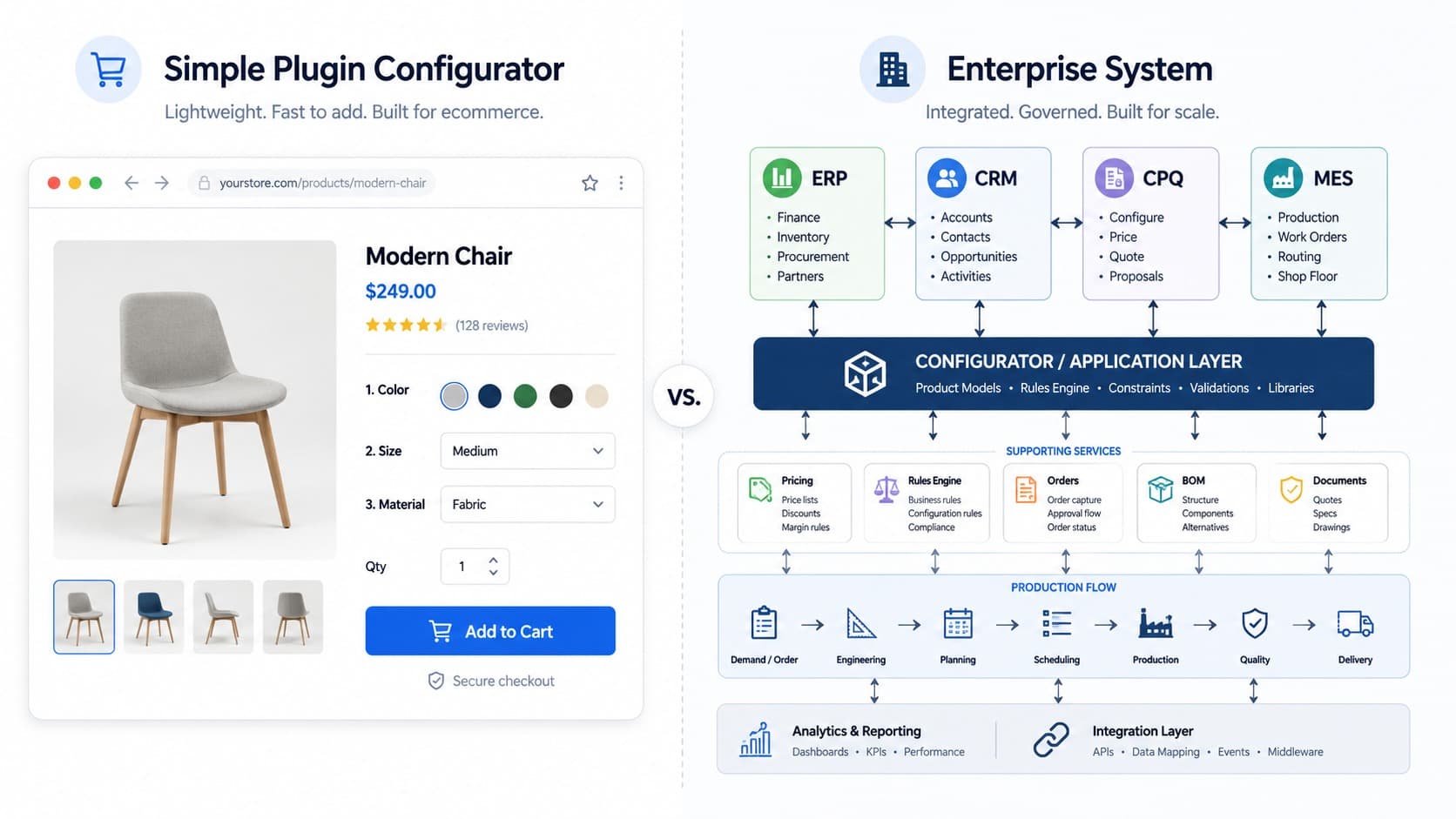
A configurator tool is a standalone or lightly integrated product - a visual customization widget, a simple CPQ app, a Shopify plugin. It solves a specific front-end problem: letting buyers see and select options, or giving sales reps a faster quoting interface.
A configurator system is an integrated platform - connected to ERP, CRM, DAM, manufacturing execution, and pricing infrastructure. It doesn't just configure: it validates, prices, quotes, and pushes structured output into the systems that fulfill the order.
The correct choice depends on product complexity, organizational structure, and what happens after configuration. Not on catalog size or company revenue.
Most businesses that think they need a system actually need a well-integrated tool. Most businesses that think a tool will do actually need a system - and find out six months post-launch.
What a Product Configurator Tool Actually Is
A configurator tool is a focused application that handles one part of the configuration problem well. It might be a 3D viewer with material swapping on a product page. It might be a CPQ app that generates quotes for a sales rep. It might be a customization widget that lets buyers add text or upload an image to a product. The defining characteristic is that it does its job and then hands off to the surrounding stack - or doesn't integrate deeply at all.
Tools are fast to deploy, relatively easy to maintain, and cost-effective for the use case they're built for. A furniture brand that needs customers to choose from six fabric options and three leg styles doesn't need an enterprise configuration system. A distributor quoting standard products with volume pricing doesn't need a multi-year ERP integration project. A tool handles these use cases cleanly.
The limitations show up at the boundaries. A tool typically can't enforce deep constraint logic across complex product families. It can't generate a BOM that feeds directly into manufacturing scheduling. It can't apply dealer-specific pricing tiers, approval workflows, and multi-currency rules simultaneously. And when the output of a configuration needs to become a formal order in your ERP, a tool usually requires a human to translate between the two.
For many businesses, that translation step is acceptable. For others, it's the thing that's been costing them two hours per order for three years.
What a Product Configurator System Actually Is
A product configurator system is integrated infrastructure. The configuration, pricing, quoting, and order processing don't happen in separate applications that exchange data imperfectly - they happen in a connected flow where a valid configuration in the front end produces a structured, actionable output in the back end without manual intervention.
In practice this means: the rule engine that prevents invalid combinations is the same engine that validates against manufacturing constraints. The pricing engine that shows the buyer a real-time total is the same engine that produces the formal quote document. The BOM generated at configuration time is the BOM that goes to production. The order that lands in the ERP is structurally identical to what the buyer or sales rep configured.
Systems are harder to implement, more expensive to maintain, and require more organizational alignment to deploy successfully. They also deliver a qualitatively different operational outcome: eliminating the manual translation steps that introduce errors, create delays, and require specialist knowledge to navigate. Gartner notes that CPQ adoption is accelerating in manufacturing and industrial sectors specifically because the cost of manual quoting at scale has become a competitive liability.
The global product configuration software market reflects this shift - valued at approximately USD 1.1 billion in 2024 and projected to reach USD 2.16 billion by 2033, with the majority of growth driven by enterprise system deployments rather than standalone tools.
Where the Line Actually Sits
The distinction between tool and system isn't about company size, catalog volume, or price point. It's about what happens downstream from a completed configuration - and how much organizational complexity that output has to navigate.
Three questions put you on the right side of the line:
What does the output need to do?
If a completed configuration produces a cart item and a confirmation email, you need a tool. If it needs to produce a formal quote document, a BOM, a production order, and entries in CRM and ERP - all consistently and without manual re-entry - you need a system. The output requirement is the clearest diagnostic criterion, and it's the one most teams fail to specify before they start evaluating vendors.
How complex is the product logic?
Visual variation - colors, materials, finishes - is tool territory. Structural dependencies, engineering constraints, dimension-driven pricing, and modules that interact with each other in non-obvious ways are system territory. The rule engine required to handle the first case is relatively simple. The rule engine required to handle the second case - complex product configuration with interdependent constraints - is the core reason configurator systems exist.
A modular sofa with six fabric choices and three leg styles: tool. A commercial HVAC system where unit capacity, installation configuration, compliance certification, and pricing all depend on each other and on building specification inputs: a complex product configurator system with deep rule engine logic is the only thing that handles that reliably. Most products sit somewhere in between, and the honest assessment of where yours falls is worth doing before you commit to either direction.
Who uses it and what do they do next?
Customers configuring on a product page and adding to cart: tool. Sales reps or dealers quoting complex products for enterprise accounts, with the quote going to a manager for approval and then to manufacturing for scheduling: system. The user workflow and the downstream handoff together define what integration depth you actually need.
The Three Categories in Practice
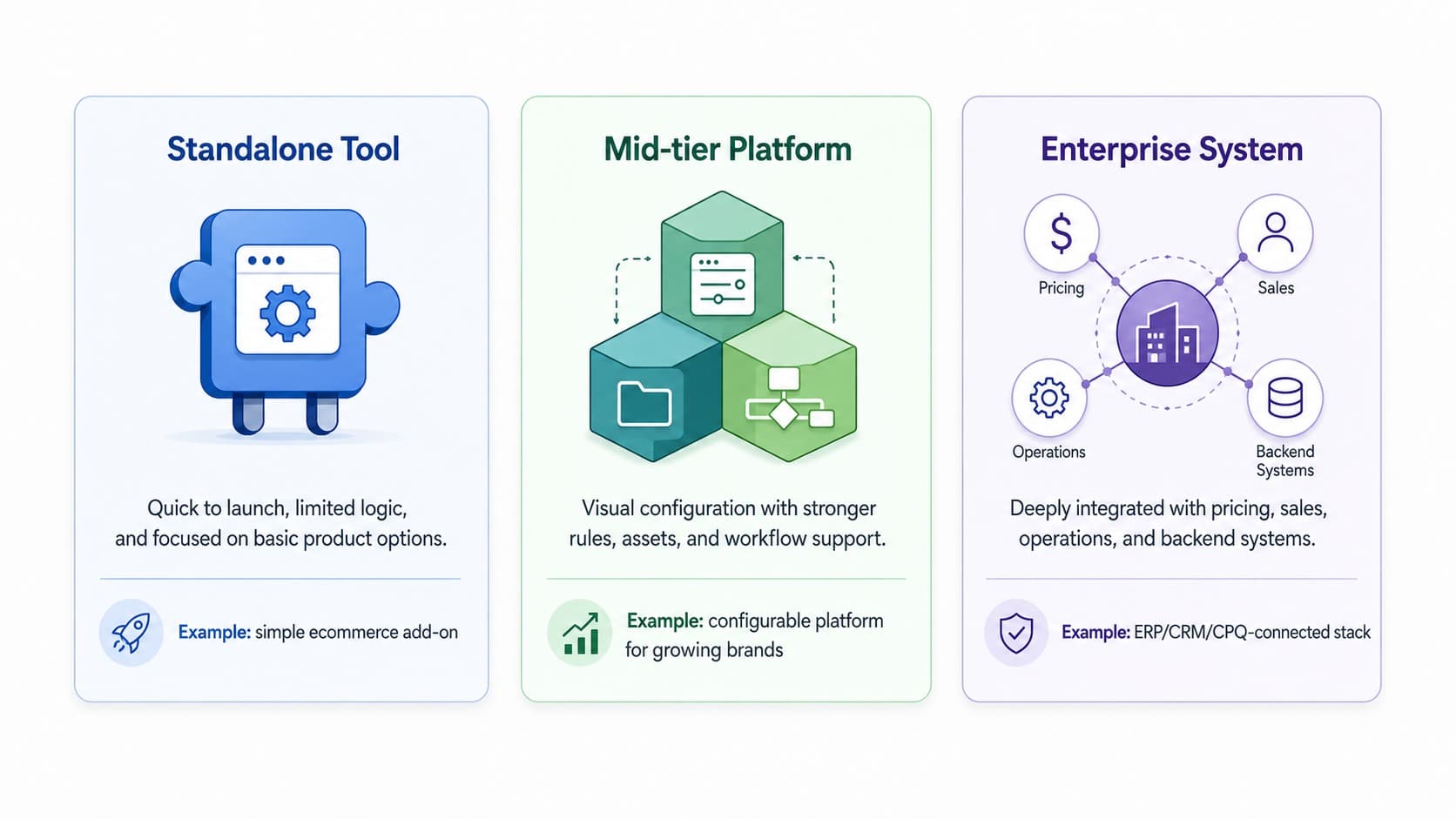
Rather than a binary, the market is better understood as three categories - which is how most implementations actually land:
Standalone tools
Shopify customization plugins, simple 3D viewers, basic quote generators. Low cost, fast setup, minimal integration. Right for: SMB ecommerce with aesthetic variation, simple B2C personalization, early-stage companies that need something live quickly and will revisit the architecture when complexity demands it.
Mid-tier integrated solutions
Platforms that combine visual configuration, rule-based constraint logic, and pricing in a unified layer with standard integrations to Shopify, Magento, or WooCommerce. They're not enterprise systems, but they're not point tools either. Vivid 3D sits in this category for visual commerce use cases - covering configuration, asset management, and multi-channel publishing in a single platform without the implementation weight of a full enterprise CPQ deployment. Right for: growing mid-market brands, manufacturers with modular visual products, teams that need more than a plugin but don't need multi-division ERP orchestration.
Enterprise configurator systems
Full configure-price-quote (CPQ) platforms (Salesforce Revenue Cloud, Epicor CPQ, Cincom CPQ) connected to ERP, CRM, manufacturing execution, and financial systems. The output of every configuration flows through the entire enterprise stack. Right for: manufacturers with engineer-to-order products, industrial distributors with complex dealer pricing, enterprises with multiple business units and cross-system reporting requirements. Implementation timelines are measured in quarters and the organizational commitment required is substantial.
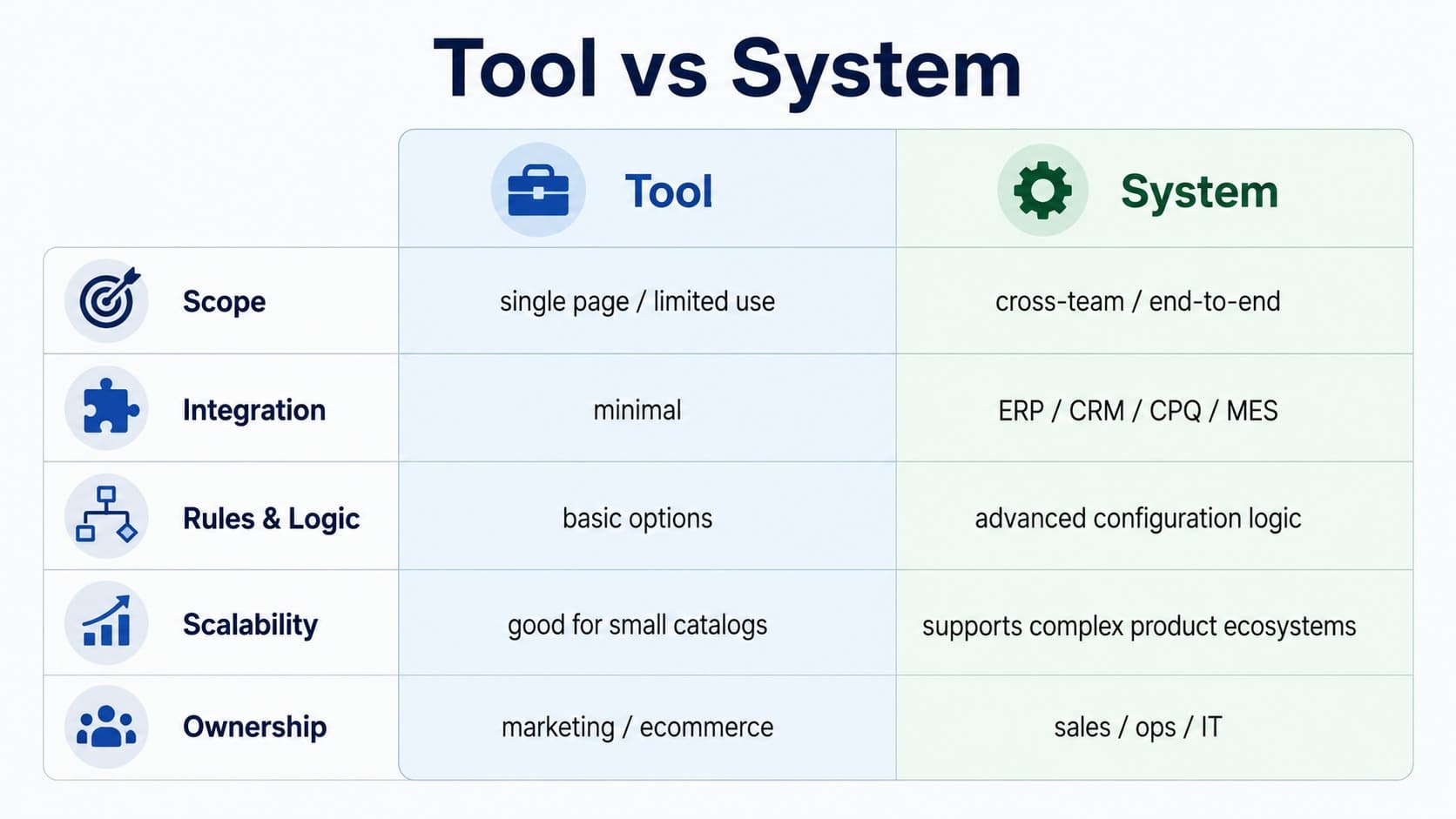
Side-by-Side Comparison
Dimension
Configurator tool
Configurator system
Primary function
Visual customization or basic quoting
End-to-end configuration, pricing, quoting, and order flow
Buying a system when you need a tool. A 12-month CPQ implementation for a company selling products with six color options and two size variants is organizational overhead that delivers no real return. The system handles complexity you don't have, requires internal resources you haven't budgeted, and slows down every catalog update because the logic requires specialist involvement. The right tool, properly integrated, covers your actual requirements at a fraction of the cost and timeline.
Buying a tool when you need a system. This is more common and more expensive over time. A tool that can't produce structured BOM output means someone re-enters data manually for every order. A tool that can't handle dealer-specific pricing means your sales team maintains a spreadsheet alongside the configurator. A tool that can't enforce engineering constraints means your customer service team handles the orders your factory can't build. These hidden costs accumulate for years before the organization commits to replacing the tool with a system - and by then, the total cost of the original underbuy has usually exceeded what the right system would have cost.
Evaluating features instead of workflows. The demo will always show the tool or system at its best. The procurement question that matters is: what does a completed order look like, end to end, from the moment a buyer or sales rep makes their first selection to the moment production starts? Map that workflow before you evaluate a single vendor. If the vendor can't walk you through that workflow in their platform with your specific product and pricing logic, you don't have enough information to decide.
How to Decide
Four questions. Answer them honestly before you look at a demo.
1. What is the most complex thing a user will configure? If the answer involves structural dependencies, engineering constraints, or dimension-driven BOM logic, you're in system territory. If it involves choosing colors and materials from a defined set, you're in tool territory.
2. What does the output feed? Cart and confirmation email: tool. ERP, CRM, and manufacturing scheduling: system. Formal quote document with approval workflow: probably system, depending on pricing complexity.
3. Who maintains it after launch? If your marketing team needs to add a new material option, and the answer involves filing a support ticket or engaging a specialist, you'll feel that every quarter. A maintainability requirement is a real system selection criterion, not an afterthought.
4. What does "scale" mean for your business in three years? If scale means more SKUs and more markets using the same configuration logic, a well-architected tool or mid-tier platform will handle it. If scale means more business units, more dealer tiers, more ERP entities, and multi-currency quoting across regulated markets, plan for a system now rather than re-platforming under pressure later.
What is the difference between a product configurator tool and a system?
A configurator tool is a standalone or lightly integrated application that handles visual customization or basic quoting. A configurator system is integrated infrastructure that connects configuration logic to pricing, ERP, CRM, and manufacturing systems - so a completed configuration produces a structured output that flows through the entire order and production workflow without manual intervention. The difference is not about catalog size or company scale - it's about what the configuration output needs to do downstream.
What is the difference between a CPQ and a product configurator?
CPQ (Configure, Price, Quote) is the commercial layer of a configurator system: it validates configurations against pricing rules, applies discount logic and approval workflows, and generates formal quote documents. A product configurator, in the narrow sense, handles the visual and technical customization layer - what the product looks like and whether the combination is physically valid. Most enterprise deployments combine both: a visual configurator front end that feeds a CPQ engine. For a full breakdown, see our guide to sales configurator vs product configurator.
Can a product configurator tool integrate with ERP?
Some tools offer ERP connectors, but the integration depth varies significantly. A basic connector might push order line items to an ERP. A system-level integration validates configurations against live ERP inventory and pricing data, generates structured BOMs on order completion, and writes directly to production scheduling. If your ERP integration requirement goes beyond passing a completed order downstream, evaluate whether you're looking for a tool with a connector or a system with native ERP integration.
How long does it take to implement a product configurator?
Standalone tools and mid-tier platforms: days to a few weeks for initial launch, depending on catalog preparation. Mid-market integrated solutions with ecommerce platform connections: 4-12 weeks including asset preparation and testing. Enterprise configurator systems with full ERP and CRM integration: 3-12 months depending on product logic complexity, number of integrated systems, and organizational readiness. Asset preparation - building or converting 3D models - is often the longest single step regardless of platform choice.
When does a business outgrow a configurator tool?
The signals are usually operational rather than strategic: manual data re-entry between the configurator and the order management system, customer service volume driven by invalid configurations that the tool didn't catch, sales reps maintaining a parallel spreadsheet for pricing cases the tool can't handle, or quote turnaround times that are still measured in days despite having a digital tool. These symptoms mean the tool is handling the front end while the back end is still running on manual processes - which is the definition of having outgrown the tool.