What Is CPQ Software? Configure, Price, Quote Explained
What Is CPQ Software? Configure, Price, Quote Explained
3D Content Production (Pipelines & Standards)
11 min
Technical writer
John Fresco
Updated:
July 30, 2026
Posted:
July 30, 2026
CPQ software stands for Configure, Price, Quote. It helps a company choose a valid product configuration, calculate the correct price, and turn that information into a quote.
That sounds straightforward until the product has dozens of options, prices change by customer or market, and every discount requires approval. At that point, preparing a quote is no longer a simple administrative task. It becomes a small engineering and pricing exercise repeated for every deal.
CPQ software brings those decisions into one workflow. Instead of checking several spreadsheets, asking a product specialist which parts fit together, and building a proposal manually, a sales representative works through a controlled process. The system knows which options are compatible, how they affect the price, and when a manager needs to approve the deal.
For businesses selling standard products at fixed prices, this may be unnecessary. For manufacturers, SaaS companies, telecom providers, building product brands, and other businesses with complex offers, it can remove a great deal of friction from the sales process.
What Does CPQ Stand For?
The three letters describe the order in which the software works:
Configure: Select the product, components, services, or subscription terms the customer needs.
Price: Calculate the cost using the relevant product rules, price lists, discounts, quantities, and contract conditions.
Quote: Create a proposal that shows exactly what the customer will receive and how much it will cost.
A company can follow this process without using CPQ software. Many still do. A salesperson may configure an offer in a spreadsheet, check prices in an ERP, ask an engineer to verify the specification, send a discount request by email, and copy everything into a quote template.
The problem is not that this process cannot work. It is that it becomes fragile as the catalog, sales team, or number of orders grows.
One outdated price list can affect several proposals. A forgotten accessory can make a configuration unusable. A quote may promise something that production cannot build. Even when the final result is correct, preparing it can take hours.
CPQ software turns those separate checks into rules that run while the quote is being created.
How Does CPQ Software Work?
Imagine a company that manufactures commercial doors.
A customer needs a door for a specific opening. They choose a size, frame, material, finish, locking system, glass panel, fire rating, and installation package. Not every option works with every other option. The fire-rated model may require a particular frame. A certain lock may only be available for two door types. Oversized products may have different delivery and installation costs.
Without CPQ, a salesperson must know these restrictions or find someone who does.
With CPQ, the process starts with the base product. As the salesperson makes selections, the software removes invalid options and adds required components. Once the configuration is complete, it calculates the price using the current commercial rules. If the requested discount falls outside the normal range, the quote is sent for approval. The final document is generated from the same configuration the system has already validated.
The quote is therefore not an isolated PDF assembled at the end. It is the output of the entire configuration and pricing process.
Configure
The configuration stage answers a practical question: what can this customer actually buy?
For a simple subscription, configuration may mean selecting a plan, number of users, and several add-ons. For industrial equipment, furniture, windows, machinery, or modular systems, it may involve dimensions, materials, components, electrical requirements, accessories, and production constraints.
A CPQ rule engine controls these relationships.
It can require one component when another is selected, block combinations that cannot be manufactured, and change the available options based on an earlier choice. It can also guide the user through the catalog by asking about capacity, dimensions, application, budget, or another business requirement.
This matters because a long catalog is not the same as a usable sales tool. A salesperson may have access to every SKU and still have no reliable way to know which group of SKUs forms a complete solution.
Price
Once the configuration is valid, the software calculates its price.
The calculation may begin with a base price, but it rarely ends there. Materials, quantities, dimensions, customer agreements, currencies, regional costs, contract duration, service levels, installation, and delivery can all change the total.
Pricing logic may also depend on combinations rather than individual products. A bundle could receive a different rate from the same items sold separately. A customer may qualify for a negotiated price. A material surcharge may apply only above a certain size. A SaaS contract may include a discount in the first year and a different price after renewal.
The point of CPQ is not merely to display a number. It is to arrive at the number consistently.
Sales representatives can still have room to negotiate, but the system defines the limits. A standard discount may be available immediately. A larger one may need approval. A price below the permitted margin may be blocked entirely.
Quote
The quote takes the approved configuration and pricing data and presents it to the customer.
Depending on the business, it may include a short pricing table or a detailed technical proposal with specifications, drawings, product images, terms, implementation services, and payment conditions.
Because the document is generated from structured data, the description, configuration, and price remain aligned. The salesperson does not need to copy a product code from one file, a price from another, and technical details from an old proposal.
After the customer accepts the quote, the data can move into the next system. That could be an ERP, an order management platform, a billing system, or a production workflow.
What Problems Does CPQ Solve?
CPQ is often presented as a way to create quotes faster. Speed matters, but it is only part of the reason companies adopt it.
The deeper problem is that product knowledge and pricing rules are usually scattered across a business.
Engineering knows which components work together. Finance controls margins. Sales knows what the customer asked for. Operations knows what can be delivered. Pricing information may live in an ERP, while customer-specific agreements are stored in a CRM or an account manager’s notes.
A manual quoting process asks one person to bring all of that information together correctly.
CPQ gives those teams a shared set of rules. Engineering constraints can be added to the configuration logic. Finance can define discount thresholds. Sales can work through the offer without memorizing the entire catalog. Operations receives cleaner order information after the quote is approved.
This is particularly useful when new salespeople need months to understand the product range. Instead of learning every exception before they can prepare a reliable quote, they can work within a system that already contains those exceptions.
It also reduces the role of “tribal knowledge.” A business should not be unable to quote a major product because one experienced employee is unavailable.
Core CPQ Features
CPQ platforms differ widely, but the useful ones tend to solve the same set of problems.
The first is product logic. The system must understand required options, incompatible combinations, bundles, dimensional limits, and other configuration rules.
The second is pricing logic. It should support the way the company actually prices products, not force every deal into a basic price list. That may include customer-specific rates, volume discounts, formulas, subscriptions, or margin controls.
Approval workflows are another important part. A deal should move forward automatically when it follows standard rules. Only genuine exceptions should require manual review.
Quote generation must also be flexible enough for the sales process. Some businesses need a one-page commercial offer. Others need technical specifications, images, legal terms, and several pricing scenarios.
Finally, CPQ usually needs to exchange information with CRM, ERP, billing, ecommerce, and production systems. Without those connections, the business may automate the quote but still have to re-enter the same data after the sale.
CPQ vs CRM and ERP
CPQ, CRM, and ERP are often connected, but they are not interchangeable.
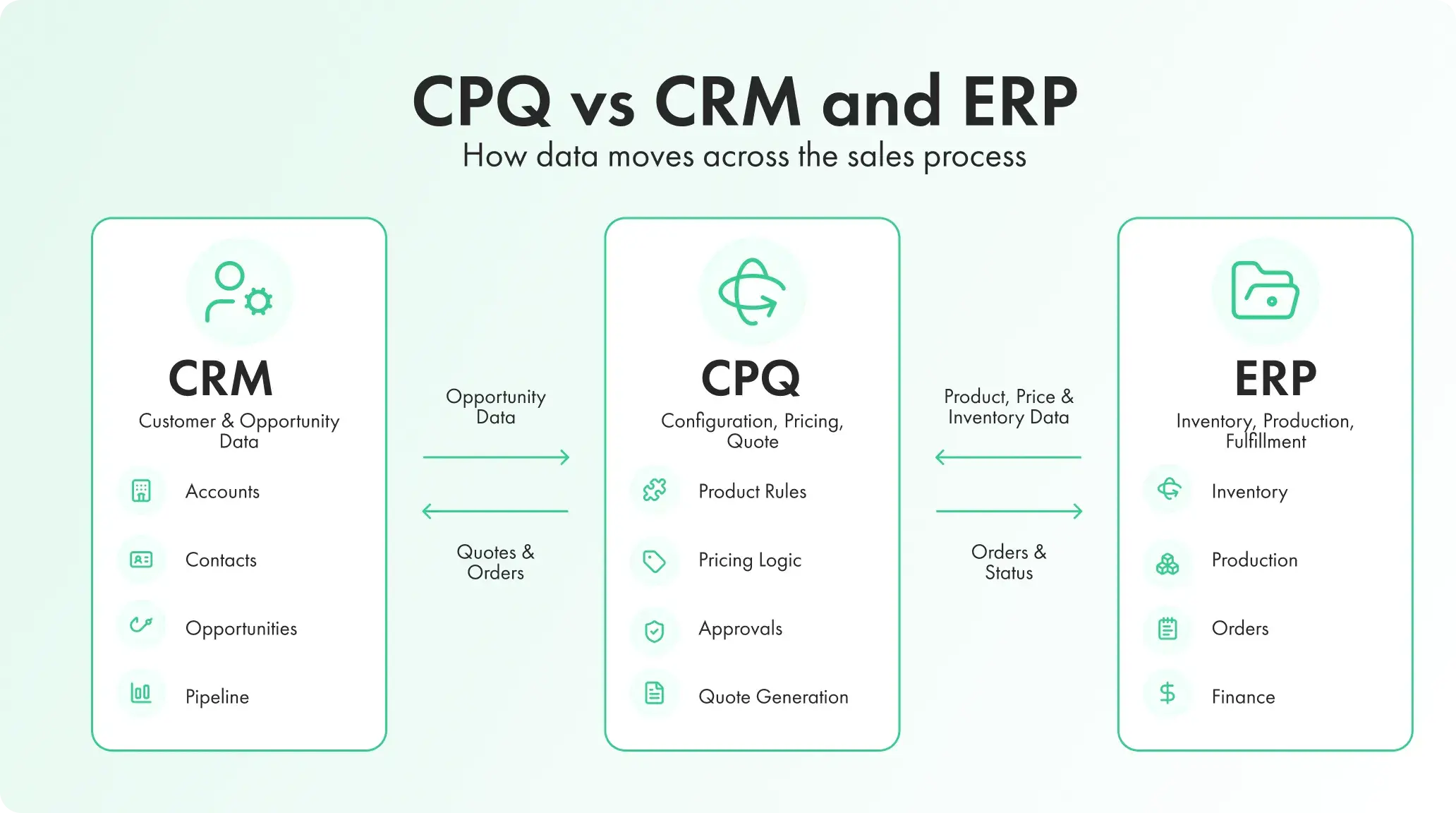
A CRM manages the relationship with the customer. It stores accounts, contacts, communication, opportunities, and pipeline information. It tells the sales team who is buying, what stage the deal has reached, and what has happened so far.
CPQ handles the offer. It determines what can be sold, how much it should cost, and what should appear in the proposal.
An ERP manages much of what happens around fulfillment and business operations. It may hold product records, costs, inventory, purchasing data, production information, and financial records.
In a connected workflow, a salesperson opens an opportunity in the CRM and launches CPQ from that record. CPQ uses product or cost data from the ERP, builds the offer, and sends the completed quote back to the CRM. Once the customer accepts it, the order moves into the ERP for fulfillment.
This is why people sometimes describe CPQ as part of CRM or ERP. It may appear inside one of those platforms, but its job is still distinct.
CPQ vs Product Configurator
The difference between CPQ and a product configurator is less obvious because both can include configuration rules.
A product configurator is mainly concerned with the product itself. It helps a user assemble a valid version by choosing materials, components, dimensions, finishes, or modules.
CPQ goes further into the commercial process. It adds pricing, discounts, approvals, and quote documents.
The two systems may be separate. A customer might configure a product on a website and send the result to a salesperson, who then prepares the commercial offer in CPQ. They may also be combined so that configuration, pricing, visualization, and quoting happen in one flow.
The right setup depends heavily on who uses the tool. Traditional CPQ is often designed for account managers and sales teams. A product configurator may be built for customers, dealers, designers, or engineers.
Traditional CPQ is good at managing rules and numbers, but it does not always help the buyer understand the product.
A quote might list a frame type, fabric code, leg option, module number, and finish. The specification can be completely accurate while still being difficult to picture.
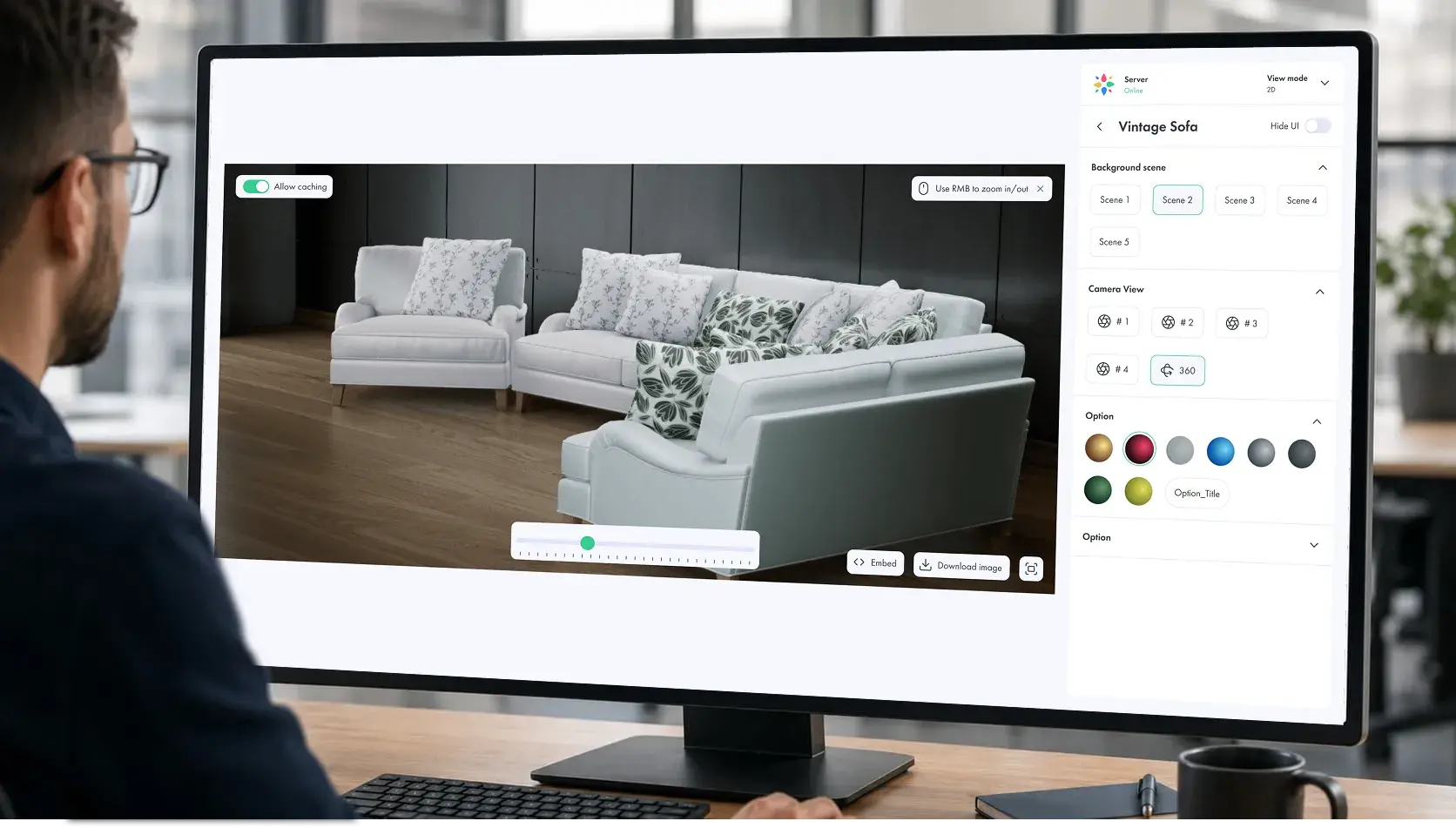
Visual CPQ adds an interactive 2D or 3D representation of the configured product to the same process. When the user changes a material, component, dimension, or layout, the model changes with it. Pricing and product data update at the same time.
This is more than placing a 3D viewer beside a quote form.
A basic viewer can rotate a product and perhaps switch colors. Visual CPQ connects what appears on screen to the product rules behind it. An invalid combination should not only be blocked in a database. It should be impossible to create in the visual interface.
The same applies to pricing. When a buyer changes from a standard material to a premium one, the image, specification, and price should all reflect that choice.
Vivid.Build, the core of the Vivid 3D visualization platform, is designed around this connection between product variants, configuration rules, visuals, and downstream output.
How Visual CPQ Changes the Buying Process
Consider a modular sofa.
In a conventional CPQ interface, a salesperson may select module codes from a list, choose upholstery from a dropdown, enter dimensions, and produce a quote. The process can be accurate, but the customer may still struggle to understand the final layout.
In a visual workflow, the customer or salesperson assembles the sofa on screen. They can add or remove sections, change the orientation, compare fabrics, and see the full result from different angles. Rules prevent unsupported layouts. The price changes as modules and materials are added.
By the time the quote is created, the customer has already seen the product being quoted.
This is useful for furniture, but the same principle applies to many configurable physical products: windows, doors, storage systems, kitchens, industrial equipment, modular buildings, vehicles, and commercial interiors.
The value is not only visual appeal. The image becomes part of the sales conversation. It helps the buyer spot misunderstandings before the order is placed and gives the salesperson a clearer way to explain expensive upgrades or structural changes.
Visual CPQ Is Not the Right Choice for Every Product
Adding 3D does not automatically improve a CPQ process.
If a company sells a service package, insurance product, or software license, a photorealistic model may add nothing. The configuration is commercial rather than physical, so a well-designed form or guided questionnaire is usually enough.
Visual CPQ makes more sense when the customer’s decision depends on appearance, scale, fit, layout, or the relationship between components.
It is also useful when text-based options are hard to interpret. A buyer may not understand the difference between two configuration codes, but they can immediately see that one changes the shape, material, or placement of a visible part.
The implementation still needs solid product data. A polished 3D model cannot compensate for incomplete configuration rules or unreliable prices. The visual layer and the commercial logic have to describe the same product.
Companies planning this type of project can use the Vivid 3D guide on how to build a 3D product configurator to understand the work involved in preparing models, setting rules, connecting pricing, and publishing the final experience.
Who Uses CPQ Software?
CPQ is common in industries where a product or contract cannot be priced correctly by selecting one item from a catalog.
Manufacturers use it for machinery, components, building products, made-to-order goods, and dealer sales. A valid quote may depend on technical compatibility, dimensions, materials, production limits, and delivery conditions.
SaaS companies use CPQ for licenses, modules, user counts, contract periods, renewals, and usage-based pricing. The product may not be physically complex, but the commercial terms often are.
Telecommunications providers use it to combine services, devices, plans, support, and contract conditions.
Furniture and interior brands use CPQ for modular products, custom dimensions, finishes, layouts, and trade orders. This is also one of the areas where visual configuration has the clearest role.
Construction and building product companies use it for windows, doors, façades, roofing systems, modular structures, and other products that are priced according to measurements and selected materials.
Professional service businesses may also use CPQ when they sell repeatable combinations of hours, deliverables, locations, service levels, and expertise.
When Does a Business Need CPQ?
The strongest sign is not company size. It is quoting complexity.
A relatively small manufacturer may need CPQ because every order is custom. A much larger retailer may not need it because all products have fixed prices and can be purchased through a normal checkout.
CPQ is worth considering when quotes take too long, salespeople use separate spreadsheets, pricing differs from one representative to another, or every deal requires help from engineering.
Other warning signs are harder to see until they become expensive. Orders reach production with missing components. Customers receive revised quotes because an option was priced incorrectly. Sales teams rely on old proposal files. Discounts are approved through long email threads without a clear record of who agreed to what.
A company may also have a configuration problem rather than a quoting problem. If customers cannot understand the options or salespeople struggle to explain the final product, a visual configurator may be more important than a traditional CPQ interface.
The market now includes sales CPQ tools, visual configurators, and CAD-driven systems with very different strengths. The Vivid 3D overview of the best product configurators provides a useful comparison of these categories.
What to Look for in CPQ Software
Start with the product, not the vendor’s feature list.
The platform must be able to represent the rules that make the product sellable. For one business, that means subscription bundles and renewal terms. For another, it means geometric constraints, manufacturing dependencies, and thousands of material combinations.
Pricing should be just as flexible. Ask whether the platform can handle the company’s current formulas, customer agreements, regional rates, discount limits, and contract structures without forcing the team back into spreadsheets.
Integration is another practical concern. Product, customer, inventory, and pricing information probably already exists elsewhere. The CPQ platform should use that data rather than create another disconnected version of it.
It is also worth looking closely at administration. Product ranges and prices change. If every update requires a development project, the system will become outdated quickly.
For physical products, evaluate the visual layer separately. Check whether the configurator can handle the full catalog, not just a few demonstration products. Look at mobile performance, model quality, configuration speed, and whether the output can feed a real quote or order.
A convincing demo is useful, but the more important question is what happens after the buyer finishes configuring.
Frequently Asked Questions
What is the CPQ process?
The CPQ process covers three stages: configuring a valid product or service, calculating its price, and creating a quote. In a complete workflow, the approved quote can then be passed to an ERP, billing system, or production platform.
Is CPQ part of CRM?
CPQ may be built into or connected to a CRM, but the two perform different jobs. CRM manages customer and opportunity information. CPQ manages the offer, price, approvals, and quote.
Is CPQ part of ERP?
CPQ can use product, cost, or inventory data from an ERP, but it normally focuses on the pre-sale process. The ERP manages operational and financial work before and after the order.
What is the difference between CPQ and a product configurator?
A product configurator helps users build a valid product. CPQ adds commercial functions such as pricing, discount controls, approvals, and quote generation. Some systems combine both.
What is CPQ in SaaS?
SaaS companies use CPQ to create subscription offers based on plans, user numbers, modules, contract duration, discounts, renewals, and usage. It is particularly useful for enterprise deals that cannot be handled through standard public pricing.
What is visual CPQ?
Visual CPQ connects configuration and pricing rules to an interactive representation of the product. The user sees the product change while the system updates the specification and price.
Can customers use CPQ software directly?
Yes, although many older CPQ platforms were built primarily for internal sales teams. Customer-facing systems let buyers configure products, see prices, and request or generate quotes online. Visual CPQ is especially suitable for this model because the buyer can understand the result without reading a technical specification.