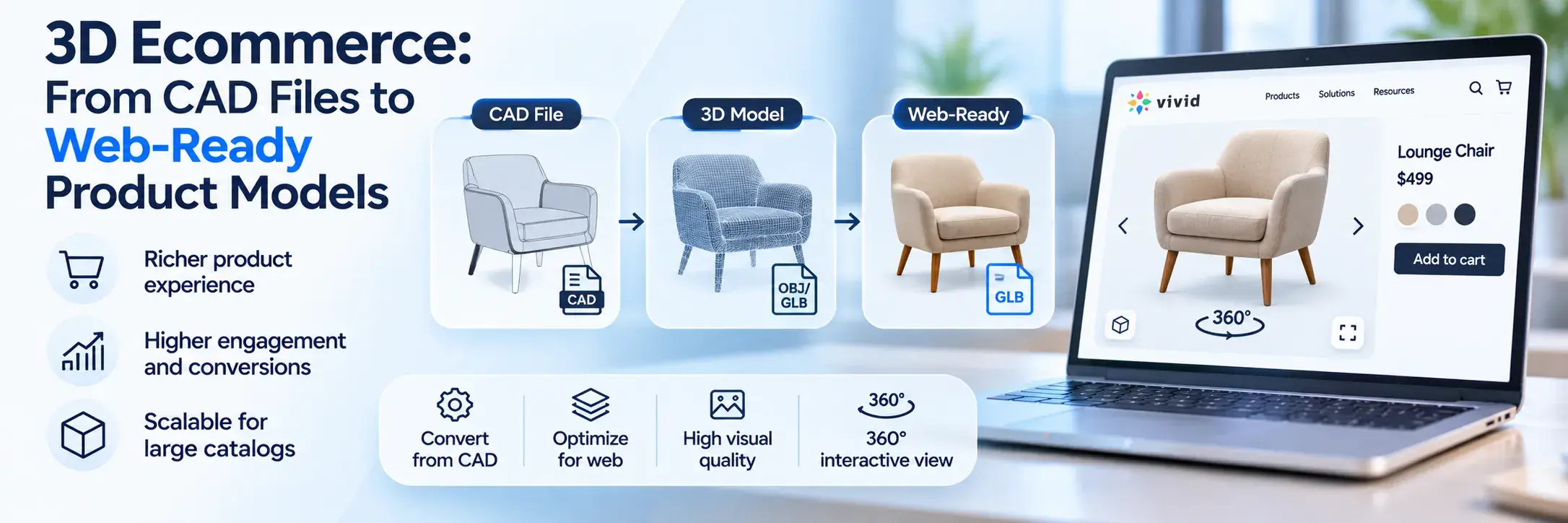
3D ecommerce means selling products online with interactive 3D models instead of, or alongside, flat photos. Shoppers rotate the product, zoom into details, change colors and place it in their room with augmented reality. For brands that manufacture what they sell, the fastest route to those models usually starts with CAD files the engineering team already has.
Most guides stop at why 3D sells. This one also covers the part they skip: how an engineering assembly weighing hundreds of megabytes becomes a model that loads on a phone in a few seconds, which budgets to hold it to, and how one asset can serve your product page, AR view and configurator at once.
What Is 3D Ecommerce?
3D ecommerce is the use of real-time 3D product models on ecommerce sites, so customers can inspect a product from any angle, customize it and preview it in their own space before buying. The model is rendered live in the browser, usually with WebGL, from a lightweight file such as GLB.
It sits between product photography and a physical showroom. A photo shows the angle the photographer chose. A 3D model shows every angle, and when the product has options (fabric, finish, size, add-ons), it shows combinations that were never photographed at all.
3D Viewers, AR, Configurators and 360 Spins: How They Differ
These terms get mixed up, and they ask for different things from your content pipeline:
| Format | What the shopper does | What it needs |
|---|
| 3D product viewer | Rotates and zooms a live model on the product page | One optimized GLB per product |
| AR view | Places the product in their room through the phone camera | GLB for Android, USDZ for iOS, true-to-scale dimensions |
| 3D configurator | Changes parts, materials and sizes and sees the result live | A modular model split into swappable parts, plus option rules |
| 360 spin | Drags through a sequence of photos or renders | Dozens of photos or renders per product, no live model |
A 360 spin looks interactive but is still a stack of images, so it can't change color or go into AR. We compared the two approaches in more detail in 3D product viewer vs 360-degree product view.
Why Retailers and Manufacturers Use 3D Product Models
The short answer is fewer unanswered questions on the product page. A shopper who can turn a sofa around and see the back panel, or check how a door handle looks in black instead of brass, has less reason to leave or to return the order.
The numbers that get published come from individual brands, so treat them as examples rather than a promise. According to Shopify, fashion brand Rebecca Minkoff found that shoppers who viewed a product as a 3D model were 44% more likely to add it to cart, and those who viewed it in AR were 65% more likely to buy. Results depend heavily on category. Products with size, fit or finish uncertainty (furniture, home improvement, footwear, configurable equipment) are the usual candidates.
For manufacturers there is a second reason. Photography scales badly with options. A cabinet line with 12 finishes, 8 handle styles and 5 widths has 480 combinations, and nobody photographs 480 cabinets. A 3D model renders each one on demand, and the same asset produces catalog images, which is why many teams use it to build a 3D product configurator instead of expanding the photo studio.
Where 3D Product Models Come From
There are three common sources, and the right one depends on what you already own:
| Source | Accuracy | Best for | Weak spot |
|---|
| CAD conversion | Exact dimensions from engineering data | Manufacturers with SolidWorks, STEP or similar files for every SKU | Files are far too heavy and need material work |
| Photogrammetry or scanning | Good shape, real surface texture | Existing physical products with no CAD, soft goods, organic shapes | Struggles with shiny, transparent or thin parts |
| Modeling from scratch | As good as the reference material | Products with only photos and drawings | Slowest per SKU, accuracy depends on the artist |
Competitor guides tend to focus on photogrammetry and studio capture because they serve retailers who buy finished goods. If you make the product, CAD is usually the better starting point: the dimensions are already correct, every variant exists as a file, and new SKUs arrive with their own models before the first unit ships. The catch is that CAD is built for manufacturing, not for a browser. That gap is what the pipeline below closes.
The CAD to Web 3D Asset Pipeline, Step by Step
A typical 3D asset pipeline for ecommerce takes a native or neutral CAD file and turns it into a compressed GLB and USDZ pair. These are the six steps:
- Clean and simplify the CAD file. Remove internal parts the shopper will never see (screws, brackets, wiring, internal ribs), merge small components and strip any proprietary engineering detail.
- Tessellate with a polygon budget. Convert precise NURBS surfaces into a triangle mesh, choosing tessellation settings that keep curves smooth without producing millions of triangles.
- Rebuild materials and textures. CAD colors are not shop-ready materials. Assign physically based rendering (PBR) materials for wood, fabric, metal and plastic, with texture maps baked at web-friendly resolutions.
- Export to GLB and USDZ. GLB covers browsers and Android AR. USDZ covers iPhone and iPad AR Quick Look.
- Compress and check file size. Apply mesh compression and texture compression, then measure the final file against your budget.
- Test on real devices and in AR. Open the model on a mid-range phone, check load time, scale in AR, material appearance under different lighting and how it looks next to the product photos.
Step 1 is where most of the size goes. A furniture assembly exported straight from engineering can include every bolt and drilled hole, and each of those turns into geometry. Deleting what a shopper can't see often does more for performance than any compression setting. It also protects you: a raw production file can reveal tolerances, internal construction and supplier parts you would never publish on purpose.
Step 3 takes the most judgment. Engineering colors are flat assignments, so a walnut veneer in CAD is often just "brown." Someone has to match finishes to real samples or photos, and this is the step that decides whether the model looks like the product or like a render of it.
The format choice in step 4 is not arbitrary. glTF is the open standard maintained by the Khronos Group, which describes it as "the JPEG of 3D," and GLB is its single-file binary version. Major platforms build around this pair: Shopify accepts GLB and USDZ up to 500 MB, automatically optimizes files over 15 MB and generates the missing format so one upload works on both iOS and Android. Relying on that automatic step is fine for a small catalog. For hundreds of SKUs, you want control over the output.
Web Performance Budgets
Budgets keep the pipeline honest. Without them, models creep up in size one SKU at a time until the product page is slow on mobile. Shopify's partner checklist for 3D models puts a typical well-optimized file at around 4 MB and recommends staying under 15 MB. The other targets below are common working practice rather than a formal standard:
| Asset property | Common target for a product page | Why it matters |
|---|
| Triangle count | Well under 500,000 per model, far fewer for mobile | Rendering speed and smooth rotation on phones |
| GLB file size | Around 4 MB typical, under 15 MB | Download time on mobile networks |
| Texture resolution | 1K to 2K per map, 4K only for close-up hero details | GPU memory and file size |
| Draw calls (separate materials) | As few as the design allows | Frame rate on low-end devices |
Compression does a lot of the work here. Draco mesh compression, a ratified glTF extension, can shrink geometry-heavy files dramatically, and KTX2 textures with Basis Universal cut texture memory. Both need viewer support, so check that your 3D viewer decodes them before switching them on.
Common Mistakes When Converting CAD for Ecommerce
Most of the problems show up only after the model is live. Watch for these:
- Publishing a direct CAD export. The model loads slowly, shows hidden internals in AR and may expose engineering data that belongs behind your firewall.
- Wrong scale or units. CAD often works in millimeters while AR expects meters, so a chair arrives in the shopper's room at the size of a building or a coin.
- Flipped or missing normals after tessellation, which make surfaces look black or see-through from certain angles.
- One giant texture for everything instead of separate maps sized to how close the shopper can zoom.
- Treating every SKU as a separate model when variants share 90% of their geometry. A configurator needs shared parts with swappable materials and components.
The last mistake is the expensive one. A catalog built as hundreds of standalone files has to be fixed hundreds of times when a handle design changes.
One Asset Library, Many Channels
A web-ready model is rarely used in one place. The same sofa model can drive the product page viewer, the AR button, a room planner, the configurator and the lifestyle renders in the catalog. Amazon also accepts 3D models for eligible listings and checks them against its own technical requirements, so a manufacturer who sells there needs yet another export of the same product.
That makes the master asset more valuable than any single export. The practical setup is a central 3D asset library that stores one high-quality master per product, with versioning, and generates the lighter outputs each channel needs. When the fabric supplier changes, you update the master once and re-export, instead of hunting through folders of GLB files with names like sofa_final_v3_FIXED.glb.
On the storefront side, a 3D product viewer that handles both GLB and USDZ, compression and AR handoff saves you from building that layer yourself. If you are adding models to an existing site, our guide on how to embed 3D models in websites walks through the options.
How to Measure 3D Ecommerce Performance
Treat 3D like any other product page change and measure it against a control. Run an A/B test where half the traffic sees the 3D viewer and half sees photos only, on the same products, for long enough to cover a full buying cycle.
The metrics that matter most are add-to-cart rate, conversion rate and return rate for the tested products. Engagement data helps explain the results: how many visitors opened the viewer, how long they interacted, how many tapped the AR button. Page speed belongs on the list too. If the 3D page loads noticeably slower, it can cancel out the gain, which is one more reason to keep to the budgets above.
Return rate needs patience. Returns arrive weeks after purchase, so a two-week test will show conversion changes long before it shows anything about returns.
Getting Started With 3D Ecommerce
Start small and with the products that carry the most uncertainty for buyers: your best sellers with many options, or the items that get returned for "not as expected." Convert 10 to 20 of them from CAD, set your file size budget before the first export, and test on real phones before anything goes live. Once the pipeline works for that batch, scaling to the rest of the catalog is mostly repetition.
If your engineering team already has CAD files and you want them working on your storefront, Vivid 3D turns them into optimized, AR-ready models and manages them in one library for every channel. Book a demo to see how your own products would run through the 3D ecommerce pipeline.
Frequently Asked Questions
Does Shopify support 3D models?
Yes. Shopify supports 3D models as product media in GLB and USDZ formats, up to 500 MB per file. It converts each upload so both formats are available for iOS and Android AR, and optimizes files over 15 MB. Your theme must support 3D media for the model to display.
What file format do 3D models need for ecommerce?
Use GLB for web viewers and Android AR, and USDZ for AR on iPhone and iPad. Most ecommerce platforms and 3D viewers expect this pair. Keep a higher-quality master file (the cleaned CAD or a source scene) so you can re-export when requirements change.
Can I use my engineering CAD files directly on my website?
Not directly. CAD files describe exact surfaces for manufacturing, so they are usually far too heavy for a browser and lack realistic materials. They can also contain proprietary detail. They need to be simplified, tessellated, textured and exported to GLB and USDZ first.
Which product categories benefit most from 3D ecommerce?
Products where shoppers worry about size, fit, finish or configuration see the biggest effect: furniture, cabinetry, windows and doors, home improvement, footwear, accessories and configurable equipment. Products that are cheap, simple or bought by habit gain much less from a 3D view.